Emporium
Members
-
Joined
-
Last visited
Everything posted by Emporium
-
If you talk in PM, why post useless info for others causing confusion ?
-
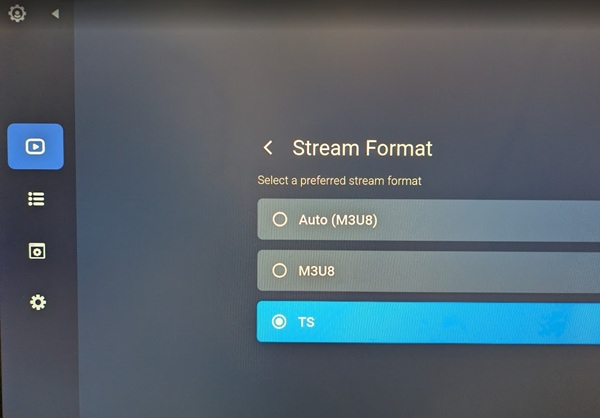
And I don't know how you say you tried rtmp when it is not even a stream format option in the app. M3U8 and TS are the only 2 stream formats. If you don't follow what I told you in my last posting in the other forum (as nbs mentioned), it will never get fixed. Devs won't waste time trying to fix anything that they can't reproduce.
-
I'm sure it was just an oversite and Buzz will add it. Considering the OK button does nothing when you are playing Catch-up anyhow, figured may as well do it like VOD (no need for arrow down) and have it just toggle play/pause directly on screen which shows the timeline which you can FWD/RWD through the Catch-up anyhow.
-
Don't know where you got a pause feature, but I checked on v330 and on v347 and there is no pause functionality. I don't even see how you would actually pause since there is no obvious play.pause control. I can go forward and backwards no problem, but there is no pause control as far as I can see. And just pressing the OK button does NOT play/pause. Maybe that would be more of a feature to be added, similar to when you are playing VOD and OK button will toggle Play/Pause icon which is on the left.
-
It's actually not as bad as it used to be on the 200 series. But for sure it easily drops battery life by quite a bit. But I really like that they brought back the single button long press to activate/deactivate, instead of going through app/menus to do it. At least in the dark, it is still easy to feel your way around to the blue button. Not as easy as it was on the 200 series where where the blue button is the bottom/right most button, but still not too bad.
-
OK first of all, if the batteries are low, you probably won't be able to toggle backlight on/off. You need to press and hold the blue button for about 3 to 5 seconds. Actually the red LED flashes as you hold the blue button down, and once it stops flashing you are toggled between backlight on/off mode. Then one you touch another button the backlight will cone on for a few seconds each time. Just tested it on mine and works as expected.
-
Dumb site.. False positive. Anyhow, I put it on my dropbox. It's easier. http://aftv.news/8143924
-
Seems like Analiti has dropped support for Android TV on more recent versions. I had installed a version from 2023 from Aptoide, and it was working on my P6. Tried it on my X5 and it worked once, but crapped out afterwards. Ended up downloading the APK for a version that was confirmed working for Dishuser, and I installed that on my X5 and it works perfectly on my X5 also. The specific version in question is: 2024.04.77596 You can easily find a copy of that specific version if you search on apkmirror or I have also downloaded it and put it here as a temporary upload (valid for 48hrs) here: https://tmpfiles.org/wOwGQhejYbr3/analiti.2024.04.77596.apk Download the APK, copy to a USB stick, and use it to install it on the X5. Or if you have downloader app installed, copy the link above (case sensitive) to downloader, to download and install it. If all you care is a basic speed tester, from Aptoide store I did install a small app called "Internet Speed Test" (Red logo with white background), from "Redmango Analytics". And it does seem to work perfectly fine. Very basic Interface, and only a small non-intrusive ad on the top right of the test screen, which is probably just some animated GIF 🙂 For reference, the version I installed was 1.25.10.27.3, which seems to be the latest available on aptoide, dated :June 13, 2026.
-
Send a private message to allaboutbuzz regarding the details of your specific IPTV service, so they can look into that specific server if possible. Maybe it is something custom with that specific server. Both main servers I use have been working fine.
-
Guess you can try V352 which was just released and see if that help 🙂
-
In the settings->Configuration are you using "Primary player" for VOD/TV Series, or do you have "External player" selected ?
-
Gmail is for Android, not AndroidTV (they sound similar, but they are different). Not a very common request to have email on an AndroidTV media box.
-
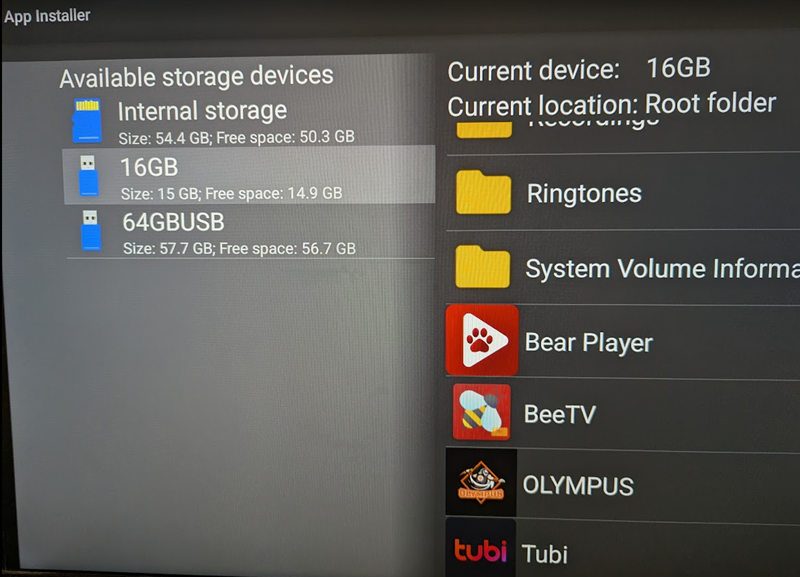
If it is to install an APK app file, the easiest is to just go into apps, and use the "app installer" app. When you launch it, on the left hand side you will see the different devices it detects (in my case, you will see below, it shows internal storage and 2 USB stick I have installed on my Classic AI. Select the stick you want, then on the right it will show you all the folders and APK apps that are on the stick. You select the app you want, and install it. If you want any more advanced file management (copying, browsing, etc..) there a rudimentary file app in the app section, but I would recommend to download a different file browser. My favorite is always Solid Explorer which I have purchased. But there many others out there, including the popular ES File explorer.
-
Agreed. I mentioned that. Been a while since I've seen a MAC server that does not use those nowadays. Unless he is really unlucky and someone on the server he uses, has already used the MAC generated by the app. 1 in 16M chances 🙂
-
Probably because they want to CLONE an existing MAC they already have on another box.
-
Even if you can replicate MAC. Many services also bind to 1 or both DeviceID values, and to the user agent string. So just because you can replicate MAC does not mean it'll work on the app anyhow. If you can, switch to a service with XC API (like DU mentioned). You then no longer need to wory about MAC. Just URL, user/pass and you can install on as many devices are you want. And many even offer multiple simultaneous conenction (2, 4 ,6 etc..)
-
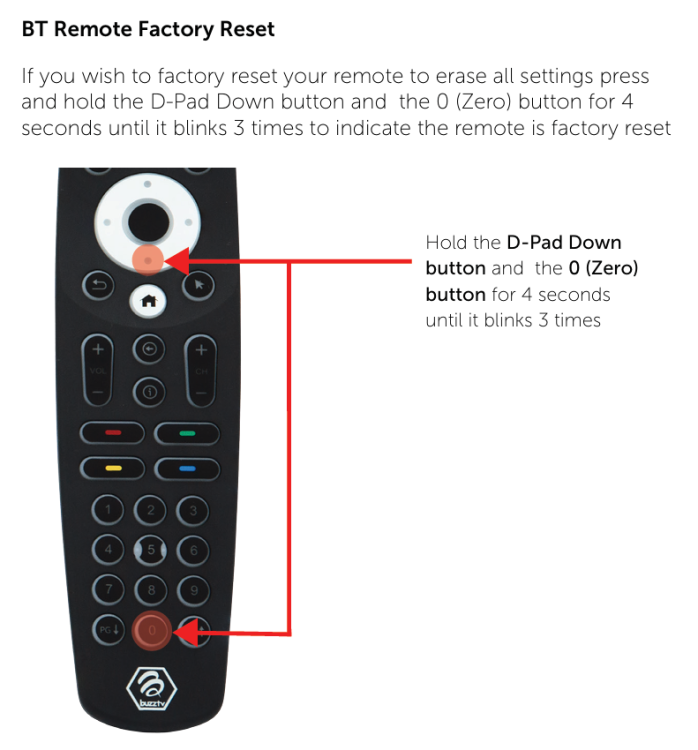
So in that case, just do a factory reset on the remote, and don't re-pair it and keep it in IR mode. The IR receivers on the Buzz boxes are so good, that you will probably not even notice the fact that is is IR mode. It's not like those old cheap android boxes where you had to be no more than 6ft in front and dead on facing the box 🙂
-
Try unpairing the BT remote with the X5. One unpaired it should automatically revert to IR mode. And see if it works any better. If it does work, then try to re-pair it again. I'm assuming you are using the BT400 ?
-
i just tested it and can confirm that using latest beta, the PVR is not accessible from any menu or even using older remotes which have dedicated PVR button. I am sure @allaboutbuzz will pass the message along, to ensure it is corrected before public release.
-
Can you please specify what exact sw version you are referring to ?
-
I have a child (my daughter), who loves to sleep in a fridge. Seriously, the A/C is at 20C pretty much all day, since she sleeps during the day, she often has the red-eye shift at the hospital. And with the wife going through menopause she backs my daughter on the temperature setting. Hence I lose and just use a thick blanket 🙂
-
Well, that is "partially" correct. To turn ON the box it is purely IR. But power off can be BT if you are using a BT remote. I just tested it on my xrs4900 with a BT200. Place remote under really heavy blanket. Power on was no possible. Powered on with IR. Then again under blanket, once powered on, everything works fine. And power button can be used to shutdown via BT. But once powered down, BT could not turn on box, had to remove remote from under blanket and IR would work to turn on. If box is turned "off" (not sleep - I never use sleep, so I don't know) the BT chip is also powered down. But once ti is up it can also receive the shutdown command.
-
Have you tried turning off the HDMI-CEC option in the device preferences ? Maybe it is being inhibited by HDMI-CEC. And I am assuming there is no blue film protective sticker still over your IR receiver on the box ? 🙂
-
Please state which box model you are using since there are dozens of Buzz boxes using buzztv5. And please provide more details on what you beed that the box stopped working ? Does it even power up, do you see anything ? Does it boot, go through buzztv logo and the go to main screen ? Is it just when you hit LiveTV or something that it does not connect to your server ? Or something else. Your description is pretty vague.
-
Does the top of the box have a gold silkscreen design ? If so, it is the Anniversary edition. The original classic was all black with no color on top.