

Everything posted by Ryu
-
what option do you have ON in CEC settings on your box? some tvs have specific port for cec behind tv. make sure you are on correct port.
-
what color light do you see on front of the box? does color change when you press power button on remote control? try to remove hdmi cable on both ends and insert again. try a different hdmi port if available and try a different hdmi cable if possible. if nothing works then factory reset box from AV hole using toothpick.
-
some iptv provider let you customize package and some dont. so if you have access to panel and allowed to remove unnecessary categories then you can remove if not then contact your provider and ask them to remove what you wanted to be removed. 🙂
-
just clear cache only. more channels with lots of guide info will increase data. thats why its better to custom package if you dont watch channels brings lots of info. so multiple servers will increase a lot more.
-
-
can you restore entire system on U5?but it still backs up between buzztv apps settings and servers favorites..etcbackup you doing on U5 is only buzztv apps settings and servers favorites..etc you are not making backup of whole system. what you doing is correct. 🙂send your Mac address to allaboutbuzz 🙂you can use voltage tester to test power supply and make sure you are getting correct power from power supply and not sure if your voltage tester all functions but this is what im talking about.
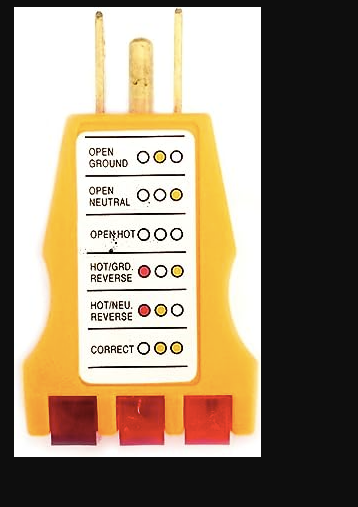 do you have outlet tester? just to see if your power outlet (from wall) is correct? also, its possible for you to test this unit on different tv?not sure if this will help you but you can try delete server and add again and see if that helps. before you add server, go to settings, buzztv app and clear cache first, and reboot your box then add and see if that helps. if you have only one server and ready to delete server then clear data as well when you clear cache. 🙂while watching live tv press ok button, then press green button, then use last option where it says Name (A-Z) and press ok. 🙂try to clear cache, clear epg, give a reboot and try again and see if that helps.settings from home screen location at top right corner. what you posted is settings from buzztv app.did anybody force you to upgrade? was that update got installed automatically? did you read before you download and install? how many post have you seen like yours? you are panic for no reason and its to early to panic. give us chance to help you. have you clear cache? did you clear epg?try to delete server and add again and see if that helps.try to clear cache and clear epgafter installation my x5 load up properly, connected but no video. changed player but nothing. reboot box all good. no issues at all and running fast. 🙂if it was off than your issue is something else.if you have hdmi cec settings on then go to cec settings and turn off virtual switch and see if that helps.I actually requested to allaboutbuzz few months ago when I was having little issue but it had nothing to do with buzztv's firmware. 🙂send pm to allaboutbuzz and provide him your Mac address. 🙂


