Skip to content
View in the app

A better way to browse. Learn more.

BuzzTV Help

A full-screen app on your home screen with push notifications, badges and more.

To install this app on iOS and iPadOS
  1. Tap the Share icon in Safari
  2. Scroll the menu and tap Add to Home Screen.
  3. Tap Add in the top-right corner.
To install this app on Android
  1. Tap the 3-dot menu (⋮) in the top-right corner of the browser.
  2. Tap Add to Home screen or Install app.
  3. Confirm by tapping Install.

nbs.

Members
  • Joined

  • Last visited

Everything posted by nbs.

  1. Do you have box unplugged when you power it up?
  2. nbs. replied to robert C's topic in XRS4900
    Go into your settings
  3. nbs. replied to Terry Knapper's topic in X5 AI / AX-C
    Means nothing
  4. nbs. replied to Terry Knapper's topic in X5 AI / AX-C
    Who said that?
  5. You would be sending your mac to buzz only They are the ones who assign the macs to your unit
  6. nbs. replied to Terry Knapper's topic in X5 AI / AX-C
    Allaboutbuzz said it will continue to record if stream is interrupted
  7. You should contact them asap as the warranty is for one year If its over I would find out where the ir sensor is. Should not be too difficult to fix
  8. nbs. replied to Dave J's topic in BuzzTV 5
    If you enter the url in your address bar what message do you get?
  9. hit the menu button and post whats at bottom please
  10. What buzz version are you running?
  11. If you want to pm one of us your username/password we can try
  12. nbs. replied to Terry Knapper's topic in X5 AI / AX-C
    if you are recording two shows together its usually easier to record from epg if possible
  13. nbs. replied to ohiosuperstar's topic in BuzzTV 5
    This thread got a little off course as you said there were no apps on home screen instead of saying apps didn't show when hitting all apps Saw that in a later post of yours
  14. nbs. replied to ohiosuperstar's topic in BuzzTV 5
    Do a clear data of buzz 5 first You will lose server info
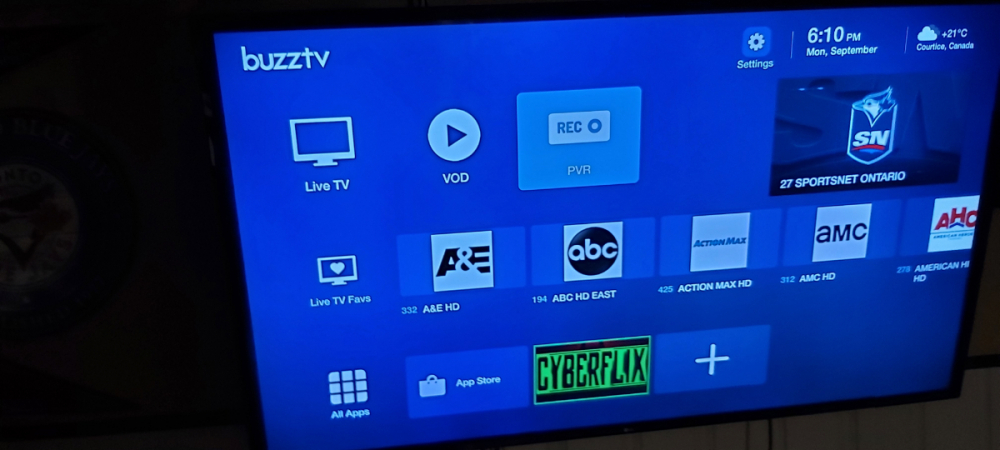
  15. nbs. replied to ohiosuperstar's topic in BuzzTV 5
    Here is a picture of my home screen on modern Bottom left corner
  16. nbs. replied to Peter Smetana's topic in BuzzTV 5
    Hit menu button and post info at bottom
  17. No that's not the reason but your imagination is pretty good...lol
  18. nbs. replied to Dave J's topic in BuzzTV 5
    Yup...lol
  19. nbs. replied to Dave J's topic in BuzzTV 5
    A complainer by proxy...lol
  20. They are working on new firmware for boxes with that version Hopefully soon as I have that one too
  21. I had an update last week and many more before that
  22. nbs. replied to Peter Smetana's topic in BuzzTV 5
    No one posts what box they are talking about
  23. After checking update type 2015 on remote Update might be there
  24. That is where you put the server info from your service You purchased

Account

Navigation

Search

Search

Configure browser push notifications

Chrome (Android)
  1. Tap the lock icon next to the address bar.
  2. Tap Permissions → Notifications.
  3. Adjust your preference.
Chrome (Desktop)
  1. Click the padlock icon in the address bar.
  2. Select Site settings.
  3. Find Notifications and adjust your preference.