

Emporium
Members
-
Joined
-
Last visited
Everything posted by Emporium
-
Update installed. Checked LiveTV for now, and still works as expected. Will do more testing this weekend. Only issue I had was that I needed to unpair and repair my remote. Minor detail, which was simple enough to address. Thnx
-
Update installed without an issue and all working as expected.
-
If you have multiple connections, it may be quite difficult to tell, unless it get's posted in one of the many sites which post daily hacked accounts. Then depending on the service you have, your account may get locked out, you may experience constant glitches, etc.. as you go over your connection limit. I've seen one that allows you to connect, you get the channel numbers and EPG, but none of the stream work, since there are already "x" number of active streams. So all depends on how it is implemented. Some services allow you to request an ISP lock, country lock, etc.. to minimize the chances that your account gets hacked. But obviously be careful what you ask for. If you travel or use your service when you are away from home on a portal device, this can cause you some headaches also.
-
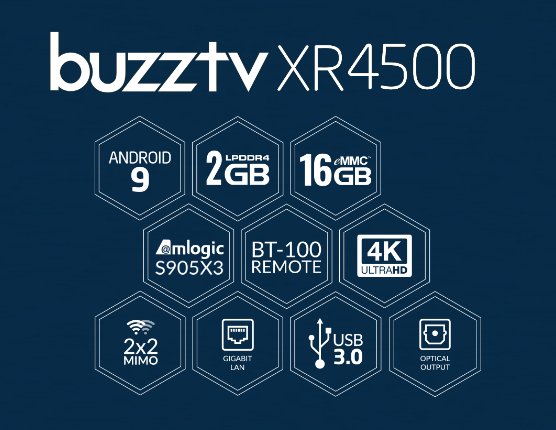
Don't know where you are seeing all these, but as far as I know there are 3 models of the 4500. The XR4500, XRS4500 and XRS4500 MAX. https://buzztv.com/site/xr-4500/ https://buzztv.com/site/xrs-4500/ https://buzztv.com/site/xrs-4500-max/ The main difference is the internal memory and onboard storage. Other than that, they are the same. I would say the xrs4500 is probably the best suited for most people (would be quicker than the xr4500 since it has 4GB of internal memory vs 2 on the basic xr4500). If the xrs4500 max is not much more, you do get double the internal storage, but if planning to use it for recordings, then a USB stick could also be used for that, if you decide to record later.


-
That it happens on occasion, it does and that is normal (nature of the beast). But I have a few streams where I can easily demonstrate that if I just flash back and forth between them, it is perfectly fine when TS is disabled. If I enable TS, then I consistently get the error messages (in most cases it eventually starts to stream, but can take 4 or 6 seconds). So obviously TS is causing some glitches on certain types of streams. Still trying different permutations/streams to narrow it down.
-
Also, if you have TS (Timeshift) enabled, try to disable it and see if it makes a difference. I found that on most streams it is fine, but on some streams it does do some strange things. Disabling Timeshift seems to correct strange "cannot decode" type errors on those streams. I am still testing it to try to find a pattern.
-
What version of BuzzTV are you using ? Hit the menu button when in LiveTV, and it should be shown at the bottom of the menu. But often switch LiveTV player will help. I find some services work better with Primary player, others backup player (or default/secondary - depending on version of BuzzTV you are running).
-
BT200 also has TV volume control buttons 🙂 So 2 extra programmable buttons.
-
I just paired my BT100 and it works perfectly fine also with the U5.
-
The U5 audio settings are identical to the X5. These are based on Android TV OS version 11. The 4900 Android 9.
-
Nothing to do with the sub. What these are you on to start with ? The modern theme, or the old classic theme ? Modern theme you have at least 2 ways to get to setting. You have icon on the top, which is a shortcut to settings.. And you can also click on the "all apps" icons, and you should have a gear icon in there. And if you been there before, you should also have a gear icon on the last line of the screen if you scroll to the right. If you are on the Classic theme, you have one shortcut on the main row of apps, if you scroll to the right. And if you click on ALL Apps, you should also have a gear icon for the settings.
-
My 4500 is presently at 5.0.767. Initial conversion from Buzz 4 to Buzz 5 I believe will bring you to .653 or something around that. Then a few minutes later (can take up to 15 minutes or so) it will update via OTA to the latest version which as of this moment is 5.0.767.
-
I just tested suspend on my second 4900 which I JUST finally got around to upgrading to buzztv 5 earlier this afternoon. Works as expected. When you have power definition set to suspend, and you are watching LiveTV, it will just put the device into a sleep state, screen turns off, and unit goes from Blue LED to Red LED. When you power it back on, it will come one nearly instantaneously, and resume in LiveTV and then continue streaming the same channel you were tuned to when you went into suspend. So the issue is not with BuzzTV 5. It is something in the U5 firmware specifically and like dishuser mentioned, I am sure it will be fixed shortly.
-
Are you turning on WiFi while you are still connected via Ethernet ? If so, unplug the ethernet cable first.
-
What theme are you using ? Try switching themes to something like Buzz Classic.. And then go back in and change back to buzz modern.
-
I JUST upgraded my second 4900 10 minutes ago (t was long overdue, but I used the file in the downloads section of this forum - since my box had really old firmware 20210411 or something like that). But even then, everything worked like a charm and lost nothing. Even my favorites are still there, and all my apps. Only thing I had to do was go into PVR options and redo the options of where my pvr recordings, TS, and vod downloads go. That's it. Got one message upon first boot about some service not starting, but that was only first boot. rebooted twice since then and it is clean.
-
On the U5, at the moment, if you have the powerkey definition set to "suspend" or "force suspend" (I tried both) it does nothing more than bring you to the home screen. It will not put the device in suspend (as we know it on other devices). Light stays blue and screen stays on. (NOTE: I am using the BT400, with remote paired, I have not tried with IR remote, if that makes a difference. It should not, but maybe something slipped through the crack). Also, unlike previous devices, when the new devices (at least on the X5 - but I will test again) prepare to go into suspend mode, they go to the home screen first. So when you come out of suspend, it is quick in resuming since it doesn't go through the boot sequence, but you are in the home screen, not in liveTV even if that is where you were when you hit the power key to go into suspend.
-
BuzzTV 5 is out of beta. IT is what gets delivered with all new boxes (X5, HD5, U5, etc..). Been running it for over a year, and it works great. If you choose to stick to buzzTV4, be prepared to live with any issues it may or may not have since there will not be any updates on v4. All efforts are now on BuzzTV5, and the fact that most boxes are synced (E2, 4000, 4500, 4900, X5, HD5, U5...) are running very close to the same version, it makes it easier to concentrate efforts on a unified front. Last week 766 was released, and all beta users were updated to that, and they are public OTA now for anyone on buzztv5. The 2015 method will take you to a beta, sure. But then there will be an OTA update to update the beta to release. But you are FREE to chose to stay on buzzTV4 if you chose. It is NOT being forced on anyone.
-
The XRS4500 uses a basic 5V power supply. So if you have a 5V power supply with at least 2A (and same barrel tip), you can always test.
-
In my case, the U5 literally does nothing if I have the powerkey def set to "suspend" or "force suspend". It's not just the LED 🙂 When set to shutdown it does shutdown. I have not tested the reboot/restart option. @sea157do you have any CEC options enabled in the HDMi settings ?
-
To factory reset you go to "settings" icon on the top, select "settings", "device preferences", "about" and there should be an option for "factory reset". I typically always do a "shutdown". But I just switched it to powerkey definition on my U5 to "suspend" and even "force suspend" and for some reason it is ignored (like you mentioned). This is obviously a small bug which will surely be corrected in a very near future update. I did however set mine for "power off", and that works fine and goes RED. However if you have a recording set, it will power on 2 minutes before the recording (even if it is not in suspend mode), and it will start the recording 2 minutes later as scheduled.
-
No issues on E2 here. Watching a channel and I did a quick record for 5 minutes and had no issues. Went into PVR to play it back (and it asked me for permissions - strange since it didn't for the record - I said "allow"), and it allowed me to play back without issue.
-
@cyrowth, I have one of these cheap HDMI switches and when I connect the X5 using the switch, it will NOT power off even if I turn my monitor off. https://www.amazon.ca/dp/B07QZ46SLH My monitor is only 1080p, so if you are using 2K or 4K, you would need to get a switch that supports the required resolution. Maybe something like this: https://www.amazon.ca/dp/B09BDT2XM6
-
You can probably do a manual installation using the file from here, and then you would be able to do a typical OTA update. BUT before doing that, I would day, wait for @allaboutbuzzto comment. Just in case there were is something we are not aware of.
-
Have you managed to copy any other remote ? Just curious.. I can't comment about the more recent vizio units, but the older ones even shared some codes/overlaps with LG remotes, so the frequencies are not anything fancy. I know I recently tried on an archaic "audiovox" TV (copying to the IR-100 from my E2), and it was difficult, but I managed to do it. I realized that the audiovox remote would not continuously transmit the power button IR as long as you pressed it. As soon as you hit it, it would flash for a split second and that's it. So I had to point the remote at different angles and constantly press/release the power button, and if finally worked. Just a thought.

