Ryu
Members
-
Joined
-
Last visited
Everything posted by Ryu
-
Output Resolution: 4K (3840 x 2160) CPU : Amlogic S905X3 64-bit quad-core ARM® Cortex™ A55 GPU : G31™ MP2 RAM: 2GB DDR3 Storage: 32GB eMMC Operating System: Android OS 9 Pie --------------------------------------------------------- WIFI: 2.4GHz / 5GHz Dual-Band 2X2 Wifi LAN: Ethernet 10/100 BT: 5.0 -------------------------------------------------------- Video decoder : 4K@60fps, VP9, H.265(HEVC) , H.264(AVC, MVC) , Real , MPEG1/2/4 , Video Format : TS , MKV , FLV , MOV , AVI , RM , MP4 Audio Format : MPEG-1 Layer 1,2 , AAC-LC , HE AAC V1 Image decoder : JPG , BMP , GIF , PNG Support Language : Global ---------------------------------------------------------- Length : 10.5cm Width : 10.5cm Thickness: 2cm Color : Black --------------------------------------------------- USB2.0 : 1 USB3.0 : 1 MicroSD: 1 Power Interface : 1 Optical Audio : 1 HDMI 2.0 (CEC) : 1 10/100 LAN : 1 ---------------------------------------------------- Type : 5V 2 Amp Adapter ----------------------------------------------------

-
Amlogic Quad Core Android 9 PIE 2GB RAM 16GB Memory Optical Output HDMI 2.0 Dual-Band 2x2 Wi-Fi Bluetooth 5.0 Power Supply 5V 2000mA. StreamPro App
-
try different HDMI cable
-
have you tried that ssd with your pc and see if it pops up and try to save and play form it on different device. remove ssd drive and try to record internally. if that works then reformat ssd again and try again. if it does not then either it was not formatted properly or doing something wrong.
-
thats so cool tiger 🙂
-
or have them lock you with your ISP/IP/country....etc
-
I have seen this when theres someone else trying to log in with your info. so if two people are logged in it will give you problem when you tried to change channel or change category...etc. it starts to work as soon other user leaves when they see same problem on their end. I would say talk to your provider an ask them switch you to username /password (XC API ) option if using Mac option or change your credentials if you are already using XC API option.
-
Buzz xrs 4500 or 4900 you can not go wrong. 🙂
-
yes you are missing a lot. it has buzztv5 but 4500 will get too. you will need more processing power as technology changing everyday, channels turning HD, more channels and data, movies...etc being add (depends on server), need more power 🙂 but again, it all depends on if you really need one but buzz xrs4900 is good choice for long period of time. 🙂
-
upgrade is always worth it. but it really depends do you really need one. 🙂
-
factory reset your box and start again and see if that helps. also, try to use different batteries if possible.
-
-
factory reset might help
-
glad all is good. 🙂
-
make sure hdmi is properly seated and port is not loose. try switching hdmi cable and see if that helps.
-
it must be server then. I dont have that server but hopefully someone will confirm that but looks like its server end to me as you did all the steps. I would say wait day or two and see if that changes.
-
if channel has no data from server coming in then it won't display. have you tried to reboot your network? sometime network create problems too. give a shot.
-
have you reboot your box? try to kill apps running in the background. then clear cache again and leave your box sit on 1 channel for while. come back in few minutes and check to see if it loads up.
-
no worries 🙂 enjoy
-
From home screen click settings, Than apps, Then click buzz tv4 Then clear cache Hope this will work
-
glad it worked. enjoy 🙂
-
clear cache and try again
-
wipe data and reset again and leave it alone for little while after reboot. sometimes it may take some time to load after after factory reset. if still nothing then you may need to pm allaboutbuzz.
-
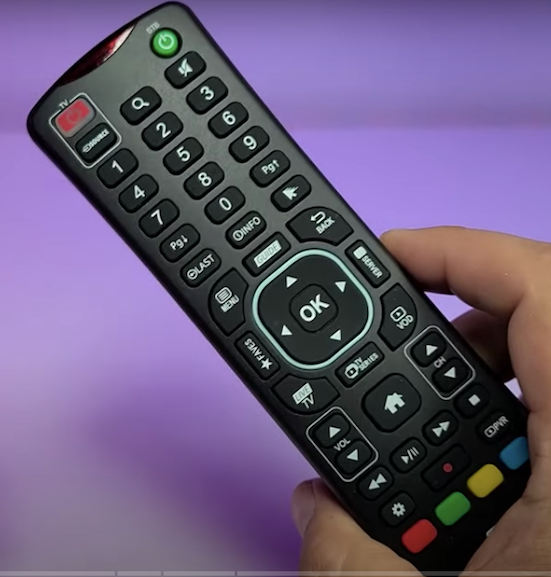
"Buzztv ARQ-100 Version 2 Air Mouse remote is something created to work with buzztv models heartbeat to heartbeat. It has been designed to function properly for all models, starting from 4000 series to 4500, 4900 and Essential E1 and E2 which they just released". https://www.amazon.com/BuzzTV-ARQ-100-Wireless-Keyboard-Android/dp/B07KMLZKNV?dchild=1&keywords=buzztv+arq-100&qid=1626717791&sr=8-3&linkCode=sl1&tag=httpwwwxctech-20&linkId=aa25cb18acaaf75170e5d7f5dbf0eb35&language=en_US&ref_=as_li_ss_tl https://www.amazon.ca/BuzzTV-ARQ-100-Wireless-Keyboard-Android/dp/B07KMLZKNV?dchild=1&keywords=arq-100&qid=1626717851&sr=8-7&linkCode=sl1&tag=xctechs07-20&linkId=38a00e8cfff66287ec5db840c0f7c20d&language=en_CA&ref_=as_li_ss_tl