

Ryu
Members
-
Joined
-
Last visited
Everything posted by Ryu
-
good job 🙂
-
no worries at bud 🙂 btw, you dont like ryu's hadoken 😀 hahahaha keep us posted 🙂
-
if it started since you added live tv service then it must be server related. try to remove service for 1 day and check to see if that happens again. if happens again I would reset my device. you may loose your apps and settings those never came with device.
-
it really depends on angle you are viewing.
-
https://www.youtube.com/watch?v=ERcmuCZuvsU
-
-
disconnect power supply for 30 second and remove batteries from your remote control and wait at least 1 minute. now insert batteries again and turn on your box and see if that works.
-
some sellers do accept free returns so buy and test and it if does not work then return it.
-
-
@RobG59 check your pm please
-
I just read your other thread. what error do you get when you use XC?
-
@nbs. correct me if im wrong but I thought default or secondary player one of those was vlc player. thanks 🙂
-
depends how you want to use your iptv. if you are going to use with Mac address then you have to register your Mac address with your iptv provider which starts with 00:1A:79:.... then your provider will give you portal/url. you open up buzz tv app and you add your portal/url under Mac server area. if you provider gave you portal/url and username and password then you dont worry about Mac address. just open up buzz tv app and and enter your portal/url and username/pasword in XC area. if you are using as m3u then you open up buzz tv app and enter your m3u info in m3u area. hope this will help 🙂 but in future try to open up your own thread. 🙂
-
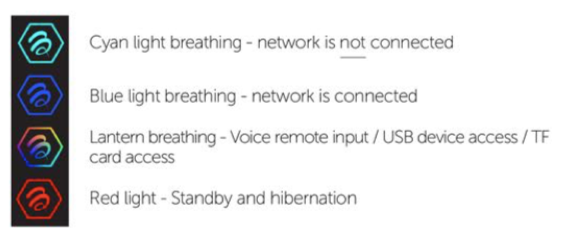
probably means network is connected
-
no discussion of iptv servers here. however, when you subscribe they will give you portal url or username /password. if you use with Mac address its called MAC and if you use as username/password option then its called XC.
-
try to type slow
-
be honest how many buzz devices do you own and how many of them buzz broke them after update? Buzz team working hard to built us update and fix issues those we have and create new features the one we ask them. why would they break things? seriously makes no sense.
-
thanks boss 🙂
-
no worries bud. that is what we do here help and protect each other 🙂
-
@Mohamedally or @allaboutbuzz maybe someone wants to edit and remove his phone number for his safety. 🙂
-
@Maestro701 looks like as you said my thread will redirect here 😜
-
opppss then I will ask allaboutbuzz to sticky it 😄
-
all 4000+ series will get buzz 5 🙂
-
@nbs. me and Maestro are just too excited and enjoying talking while we are waiting for much needed update lol 🙂
-
I will have nbs sticky my thread 🙂



