Emporium
Members
-
Joined
-
Last visited
Everything posted by Emporium
-
Have you tried installing any iptv software on your phone or tablet and try to connect to your server, just to see if it is box specific or maybe your internet ? As a quick test maybe see if you switch to phone data and see if it works. You can possibly as a quick test put your phone in hotspot mode, connect to it and see if it connects. Did you try rebooting your modem/router ? Don't know where you are located but I know some modems (like Xfinity gateways) have Advanced Security is turned on by default, which you sometimes need to disable. I know this one is obvious, but did you check to make sure your account is not expired ? 🙂 I always forget on mine, and to not admit guilt, I tell the wife it was a server issue.. lol
-
They are not targetting the Buzz boxes. All of mine work fine on multiple servers. But many ISPs are blocking certain types of traffic and destinations. You may have to use a VPN service to bypass any blocking being implemented by your ISP. And have you verified that it is not an issue on the server end ? This has nothing to do with you specific Buzz box, and we do not discuss specific services on this forum.
-
Any what type of sub do you have ? MAC/XC/M3U ?
-
If you clear DATA you will lose your favorites. If you plan to do that, then you should use the backup&restore function that is in the menu->settings->configuration menu first. And make sure you backup to a USB stick ideally. You can verify if it went to the USB stick by checking afterward if you have a small ZIP file on the usb stick. This will backup your server entries, settings and favorites. Actually, probably a good thing to do even if you don't plan to do a reset. You can restore these on any other device running BuzzTV 5. You supplier may say it is not on their end (famous last words), but do you know anyone else with the same service, and check with them if theirs is working ? As a test you can also install a software like stbemu (from any playstore - google or aptoide) and set it to same MAC and see if it works. you may need to ask your provider to do a device reset on your account if you get a "device not registered message", since you will be using a different software. If nothing works, you can email them directly with your info: Box model, buzztv software version and which server you are using and mention you are using MAC based sub and the issue you are having. cs @ buzztv . com
-
Try creating a new server entry. You can call it whatever you want (myserver2) and see if this newly created entry will download the program guide.
-
First of all, it is not a "beta". It has not been a beta for nearly 5 years now 🙂 What version are you running now (hit menu button, and should be on bottom left). Latest version is 5.0.961 For your EPG issue, have you tried to "CLEAR EPG" to see if it repopulates ? If EPG gets corrupted for some reason, it may fail to subsequently update, so you may need to clear it. Should be in the menu->settings->configuration if you scroll down to the EPG section. After you select "CLEAR EPG" give it 4 or 5 seconds, until you get the message saying it was cleared, before returning to main video screen.
-
The BT350 remote does NOT pair/program like the BT400/500. The BT350 has 4 IR programmable/learn buttons, which you can program for TV use. The rest only pairs to the box via Bluetooth. If there is any interaction between TV and Box, it would be through the HDMI CEC.
-
What is your definition of "regular setup stuff". When you boot the new machine, it will ask you basic stuff like language, and to pair the remote, and I believe to connect to network. You can do all these, and the box will then be able to take any updates (firmware and/or software). Then when you give it to your son, he only needs to connect to his wifi (easy enough), and add his IPTV provider credentials. If you want to test it, you can possibly even use your IPTV server credentials to test the box, and then when you are done, you can easily delete the server entry, leaving it blank for your son to be able to enter a new server. I do this all the time for friends and colleagues all the time. These boxes do NOT force you to sign into services like google play, etc...
-
As mentioned, it is NOT possible.
-
Sure it is not his internet ? If he is using WiFi, maybe as a test have him try using a direct ethernet cable. Speed is not the only factor for internet connection. It needs to be stable. Fast and unstable is useless. Better slightly slower and stable. And not all wifi routers are created equal. I've given my B5 to my mom and she has no complaints (it is hard wired to her old asus router - not wifi) and have not reset it ever since I installed it over a year ago.
-
I don't see an issue saving them as favorites. That is what it was designed for. For TV Series keep in mind that if your service provider changes servers on and series_id in the back end or shuffles things around, your favorites may show the program and imdb/tvdb summary of the show, but may not show the different seasons and episodes available (if the series_id has changed). If this happens, you would need to remove that TV show from favorites and then search for it, and add it back. It happens from time to time. For LiveTV channels, I have way over 200 favorites and I even have 2 favorites categories (one for me, and one for the boss herself). For TV Shows, I typically have a dozen or so favorites which are the ones I am following typically. For Movies, I typically add them to my favorites when browsing, to tag them "to watch". But once I finish watching them, I untag them. But I don't see any issue adding them to favorites. Sure the B5 is the entry level basic series 5 box, and relatively slower than the more expensive boxes, but it won't harm to add favorites. That is one of the basic features, may as well us it.
-
Try creating a new server entry (you can use the same URL and user/password as the one you already have). And see if using the new server entry seems any better. PS: Are you sure you have not changed your default players ? If you go into the menu->Settings->Configuration, what are your LiveTV and VOD/TVSeries players set 2 (they should be the first 2 options on top). LiveTV should ideally be set to "Primary" for best performance.
-
As a test, From the main screen, try going to the Settings icon on the top and go into settings, then scroll down to "Apps". Select "BuzzTV 5", and then scroll down and "Clear CACHE" (be careful if you delete data instead, you will need to recreate our server entry and redo all your favorites). See if that makes a difference.
-
For the ones that come with the box initially I am pretty sure it does, since after a fresh clean boot, it goes ahead, downloads and installs all the 3rd party apps (and you see the message on screen as it loads them). However anything YOU installed, absolutely not. You will need to download and reinstall them yourself.
-
He did say that he has tried 2 different HDMI cables and different ports on the TV. However I am not in front of my box, but I vaguely remember someone else having a similar issue and I believe it was resolved by turning off Auto Frame rate option. But not sure where it would be (since I m not home, in front of my box now). But it is something to check out in the settings/device preferences. Maybe under hdmi settings or something.
-
Lol.. I know.. What I meant to say is the issue you describe, works fine for me. When I go to that screen I get the proper update screen with all the details. But I have the other issue I described under that.
-
That aspect works fine for me. Only issue I have, which I already reported to aab, is: While watching a channel, Press "OK" to bring up channel list. Then LEFT on DPAD to bring up categories side panel. If you scroll down to the server name (in my case "w*****" for example) which also has a small down arrow to the right indicating that it's categories are expanded below, and you press "OK" on the server name to technically "rollup" the categories from that server, the left side panel all goes GRAY. Not sure if it was there prior to .281 (didn't really test that), but I just noticed it a few days ago. Does not seem to affect everyone however. But DU has also reproduced it, but others have not.
-
Just checked BOTH of my xrs4900 devices and they are BOTH at 961. And so was my old E2 and xrs4500.
-
Hard Factory reset of P6 https://www.youtube.com/watch?v=-bnzmXNyXcg Maybe the NVMe is just corrupt. May need to be completely reformatted. I have an USB NVMe adapter and I typically format my drives on my PC before installing them on media players. I have this one: https://www.amazon.ca/dp/B09XWLGD48 But there are many cheaper ones available, like this one, which is under CAD$20. https://www.amazon.ca/dp/B0CSVT8KF1 Just curious, was in possibly formatted as internal "device storage" instead of "Portable storage" ? Formatting as internal device storage can be a real pain in the b$tt. Android should do away with that concept in 2026. If it is formatted as internal device storage and then it gets corrupted somehow, it will corrupt the whole device. As "Portable Storage" it runs independently of the internal storage.
-
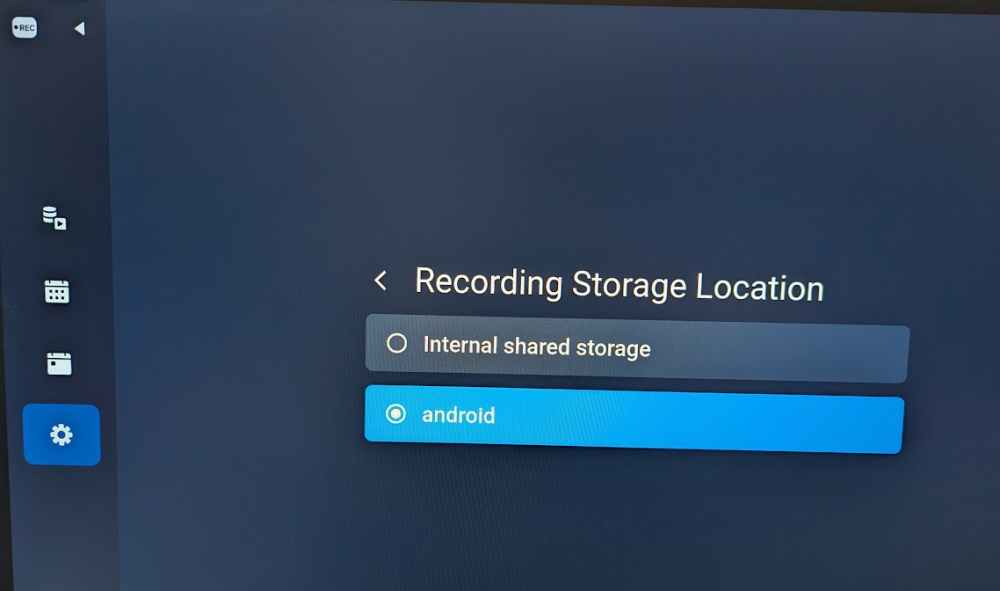
Definitely odd. I just checked and I have internal showing and "android" which is a small 250GB NVMe I have installed in it. And if you go to Settings->device Preferences->Storage you don't see the "Removable storage" ? HAVE YOU UNPLUGGED the POWER for 10 seconds on the box, instead of just power off/power on ?
-
Did you try removing the NVMe drive and see if the issues persist ? Maybe try doing a recording to the onboard storage first and see if that works. Quite possible that the nvme is toast. Would not be the first time 🙂
-
There are issues with 90% of media boxes out there that use suspend/sleep. But I don't even see why this is even an issue when booting the box takes only 30 seconds. Why even bother with standby. The only exceptions I've seen are certified google boxes that I have tested. But even those will eventually need to be power cycled, since they start acting up in various ways. And this is NOT limited to Android devices.
-
The latest comcast Xfinity stream app (USA) is on Aptoid (like nbs mentioned). Installed no problem and launched. But I don;t have an account to log in. It seems to open a web based page for sign in, so you may need to use the "mouse cursor" mode to navigate a bit. I also sideloaded the apk for the latest Rogers xfinity app (for Canada), and it also loaded and launched without an issue (just had to ensure Google's over protective "Play Protect" is and remains disabled.
-
I do to. All my boxes are set to shutdown. It's one of the first things I do. This way, always sure to have a clean boot with no residual crap from other apps or anything that is misbehaving. The whopping 30 seconds it takes to boot the box is not going to make a huge difference. The frustration of dealing with leftover crap from a standby/sleep/suspend or whatever you want to call it is just not worth it.
-
First of all it has nothing to do with BuzzTV 6 (which is the software running on the boxes). Post in the thread related to your specific hardware box. BuzzTV 6, is available on the Powerstation and on the L1. Both are very different.