Stugots
Administrators
-
Joined
-
Last visited
Everything posted by Stugots
-
Can you confirm which model box you have? The app version you posted is very outdated . For 1GB box we recommend Android 6.
-
Changing the mac option was not intended or designed to used the way your using it. Hence the reason why it was hidden feature in the first place. Because it created too many issues for consumers,providers and resellers it had to be removed. I cant explain it in any other way..... Use streaming line or another APK that allows you to change mac address are 2 easy solutions.
-
test your remote to see if its working properly
-
Changing mac addresses created way too many issues and resulted in several boxes getting blocked from service providers. Most providers support "streaming line" and its supported on xpl3000 and xr4000/xrs4000 models. Streaming line (username/password) allows you to use on multiple devices without the need to change your mac address. Simply ask your service provider for a streaming line account.
-
Im moving this thread to the proper section.
-
Hi Bob, Thanks for your feedback and suggestions. The past models we had RAM boosting option however it created several app crashes since important android applications were forcefully closed. Instead, we allow you to close applications you left opened by press the HOME button 3 times quickly on your remote control. This will help free up ram space. In terms of customization, the new look for XRS4000 allows you to add all your favorite apps on the front page of the box. The old design you can favorite only 7 apps while the new design allows you unlimited amount of favorite apps. If you click on ALL APP's this is where you can favorite your radio and other apps such as Netflix. Plus if press and hold the OK button on your remote you can remove favorite, move favorite and even uninstall the app. If you can send us a private message with your serial number so we can determine if your using the latest firmware. Cheers
-
We will look into this and reply back with an update Thx
-
-
this feature (epg on m3u) isnt support yet. later this month it will work
-
this error message means you entered the wrong URL or wrong username/password combination
-
currently we don't support EPG for m3u . Later this month we'll support this feature.
-
Update: XRS4000 arrives second week of October.
-
check YouTube for unboxing videos. the stock only arrived last week so over the coming weeks you will notice more reviews.
-
This forum as the name suggests is design for talks relating to set top boxes and its application(s). STBTALK forum rules are very simple and short. Please read them before posting. No discussions or mentions about IPTV / OTT services, portal URL's and M3U list's. No spam. All automated messages, advertisements, and links to competitor websites will be deleted immediately. Post in relevant sub-forums only. Messages posted in the wrong topic area will be removed and placed in the correct sub-forum by moderators. Respect other users. No flaming or abusing fellow forum members. Users who continue to post inflammatory, abusive comments will be deleted from the forum after two warnings are issued by moderators. Harassment. No threats or harassment of other users will be tolerated. Any instance of threatening or harassing behavior is grounds for deletion from the forums. No profanity or pornography is allowed. Posts containing this type of material will be deleted. Bandwidth. Posts containing over-sized images and signatures will be removed. Illegal content. No re-posting of copyrighted materials or other illegal content is allowed. Any posts containing illegal content or copyrighted materials will be deleted.
-
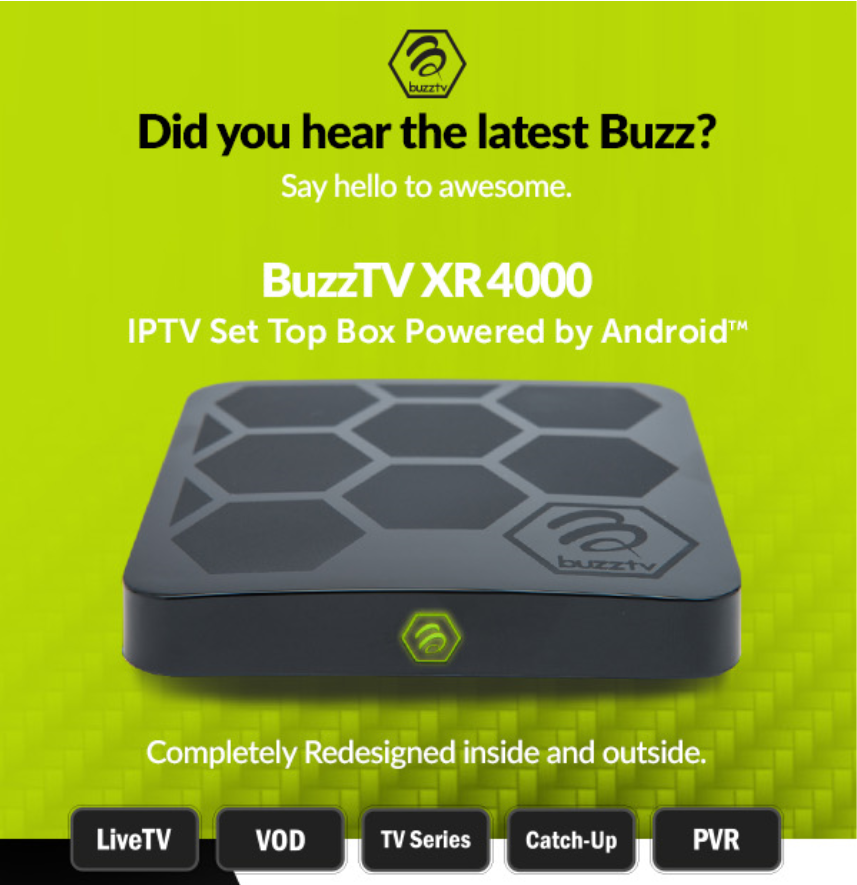
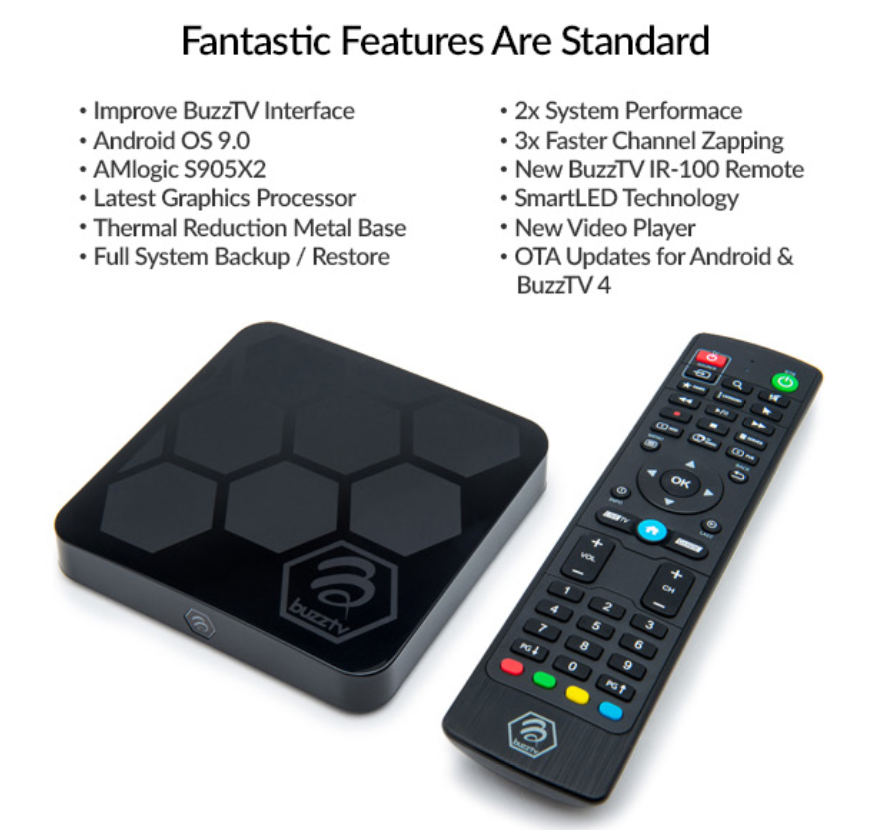
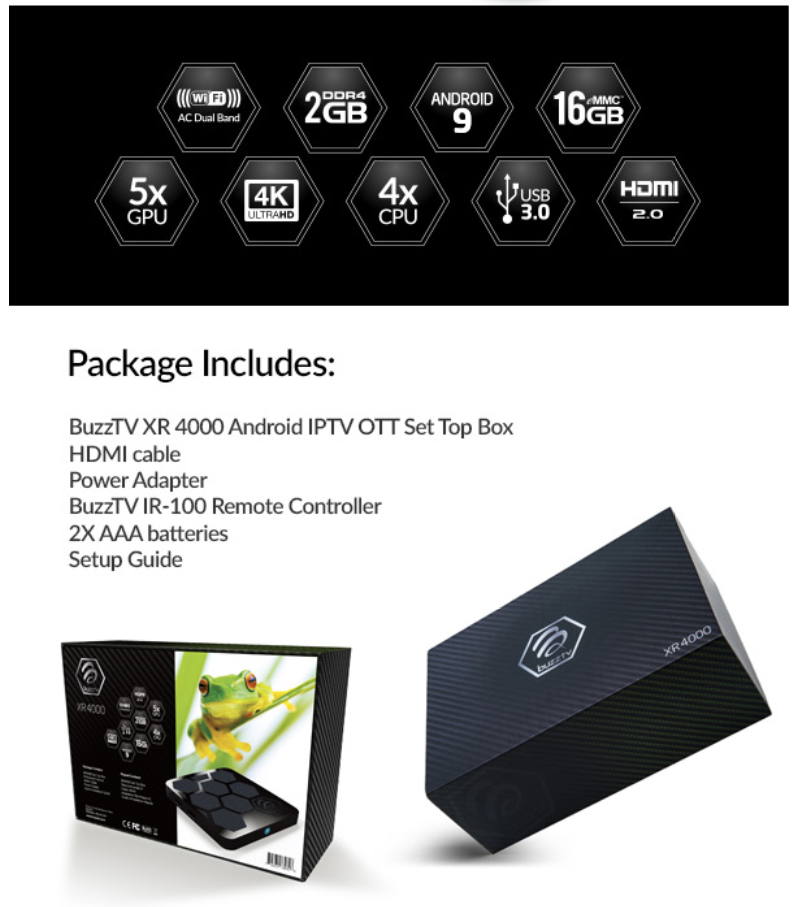
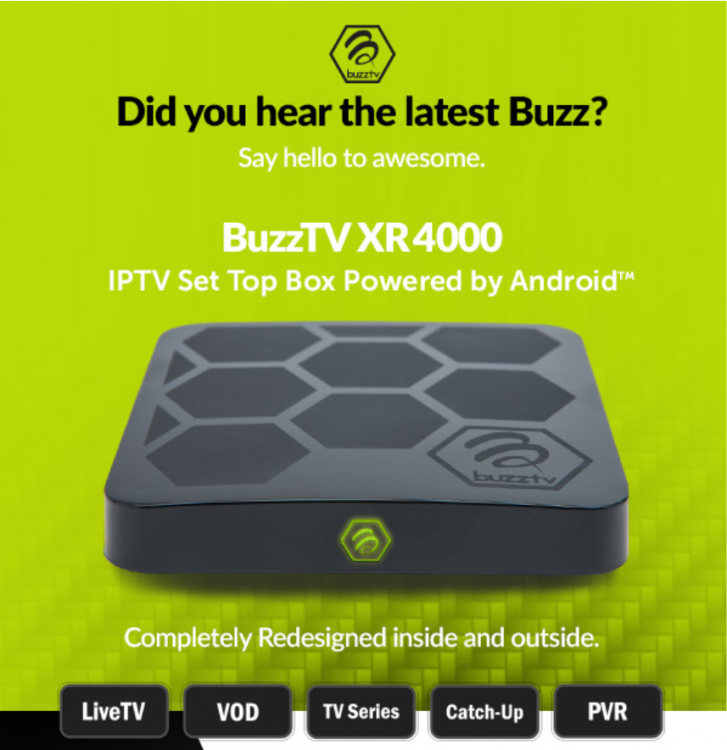
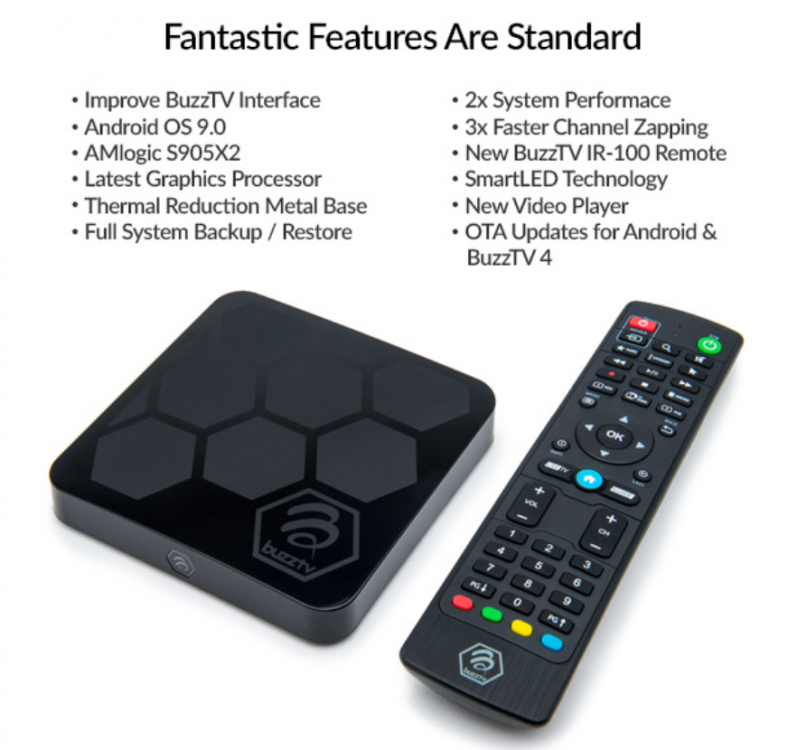
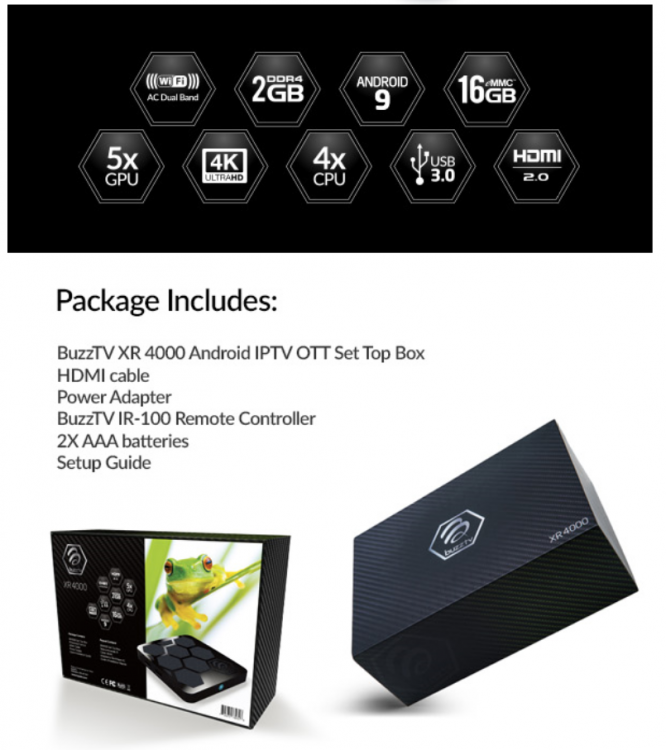
BuzzTV XR4000, Features BuzzTV 4 application and modified Android 9 OS. Other Key features: • Improve BuzzTV Interface • AMlogic S905X2 • Latest Graphics Processor • Thermal Reduction Metal Base • Full System Backup / Restore • 2x System Performance • 3x Faster Channel Zapping • New BuzzTV IR-100 Remote • SmartLED Technology • New Video Player • OTA Updates for Android & BuzzTV 4
.thumb.jpg.4cb8816b935456bc6a9b34867679cc0c.jpg)
.thumb.jpg.9509a632e619703eec86a2db69368b3c.jpg)
.thumb.jpg.347b99fc2d868ee77890050d4cbb8f32.jpg)
.thumb.jpg.9dd9cb9e26c02f392335c2f0570a2ba6.jpg)
.thumb.jpg.0cc5b7b1797cea669ff2f59a494b6867.jpg)
.thumb.jpg.26520dae1f671cd60b68a6fa6e4a0592.jpg)
.thumb.jpg.9638770ffcb7e21776fa87e727c027e1.jpg)
.thumb.jpg.5ff3921152d64c1b7e33473c95079dee.jpg)
.thumb.jpg.f288addbd6a1cf643a6e1ee6df4cd077.jpg)
.thumb.jpg.32b28798b3e4022cb1a303cb5a3c2a51.jpg)
.thumb.jpg.5f2be3b5c44bb78d775b569f1ec60fbb.jpg)
.thumb.jpg.a07b2fe7023fcf790e5a665a8a5765ca.jpg)
.thumb.jpg.dfb4c4b72bd4281805c356dd03334e02.jpg)
.thumb.jpg.366924c3cdd6b1ce9e78151c0644e80a.jpg)
.thumb.jpg.796173e08cd4d230b6c6357ed490eb29.jpg)
.thumb.jpg.ba905198d6258c4d170809ad2207b69a.jpg)
.thumb.jpg.f3aeb713b7f7bdfc4311ccb1e4d82a80.jpg)
.thumb.jpg.beb7c47abac6350f7cc9de044e1a1cbf.jpg)
.thumb.jpg.bca23b847794d0b8e8b1f66acc4050b4.jpg)
.thumb.jpg.64722cd51cda752a9dc796f99e395695.jpg)
.thumb.jpg.57d2b778522d98f93983b7dd4117e1d3.jpg)
.thumb.jpg.d2c2fc19b8d3ac68352100c91f2ae5e0.jpg)
.thumb.jpg.4909fc1e45742f10eb619d75ed77620b.jpg)
.thumb.jpg.ffd5388fc316a041008462842bea3b9d.jpg)
.thumb.jpg.ce9683e55a99d80a7c486d95f059a415.jpg)
.thumb.jpg.fd9cf8a3c68c6dff88deaf8f5666e7a6.jpg)
.thumb.jpg.aebc71f622d67ba51e945ca8523e2adb.jpg)
.thumb.jpg.345da09c28c1e68ba0a60e0308499c3e.jpg)

-
XR4000 User Manual BuzzTV-XR4000-Manual-v4.pdf
-
try factory resetting your box. all those symptoms are not normal. if app is crashing, try another player (new or secondary).
-
sent you a private message thanks
-
which setting are you using for display settings? if its on auto switch to manual 1080p 50hz
-
-
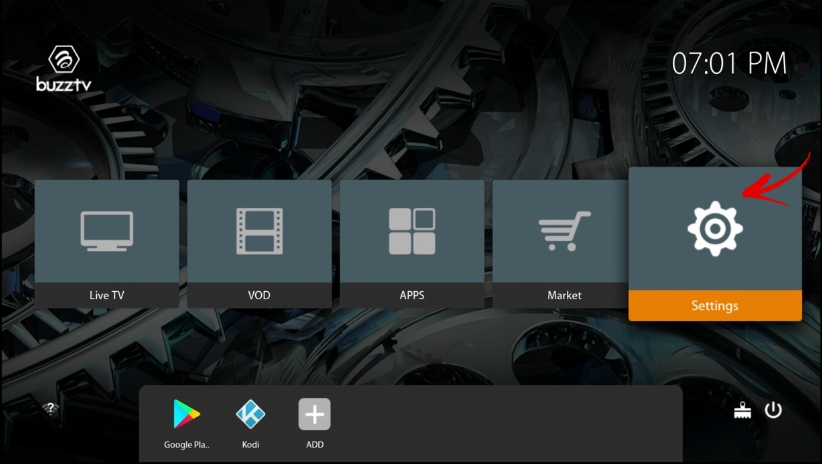
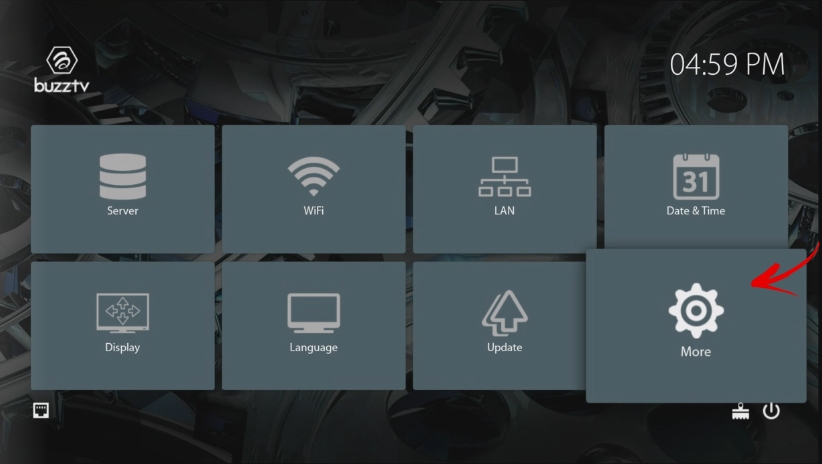
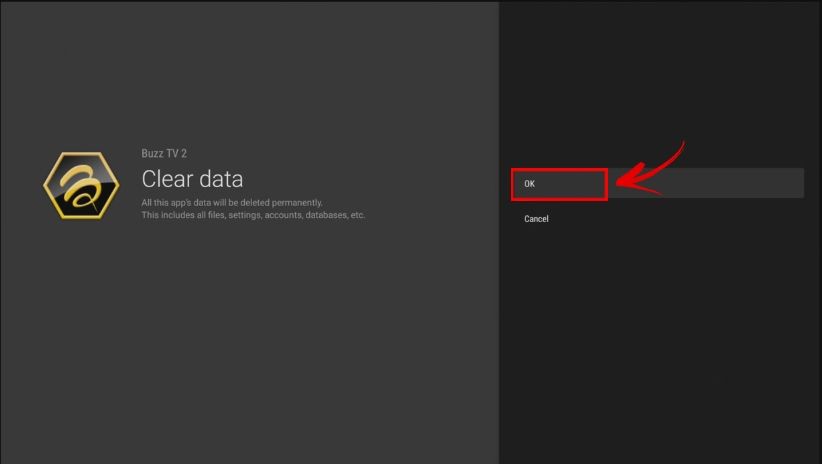
1. Select Settings 2. Select more.. 3. Select Apps 4. Scroll down to System Apps 5. Select Buzztv 2 App 6. Select Clear Data (( Warning: Your URL will be deleted )) 7. Select OK Then Press back till you are back on main screen and you can re-enter your URL.
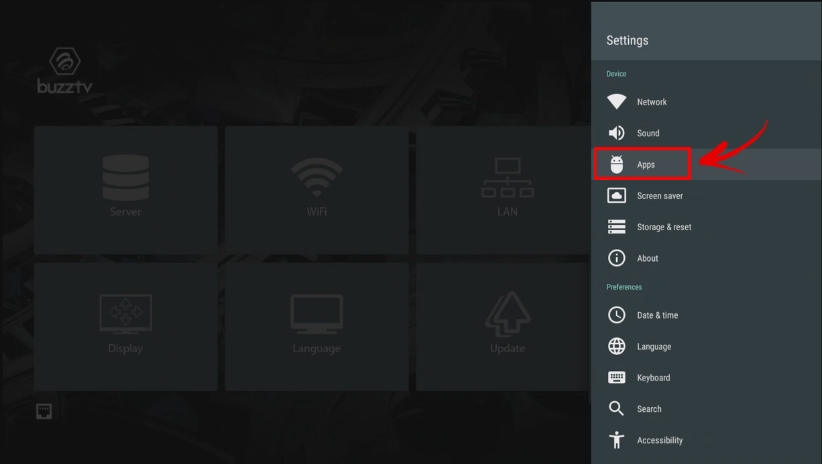
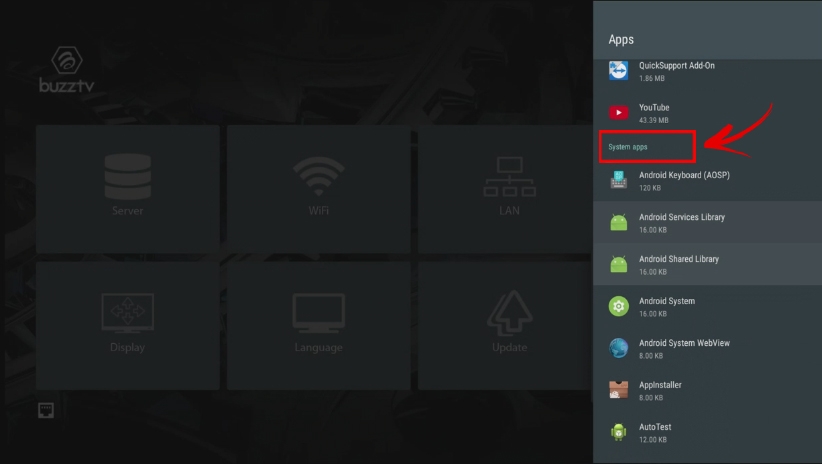
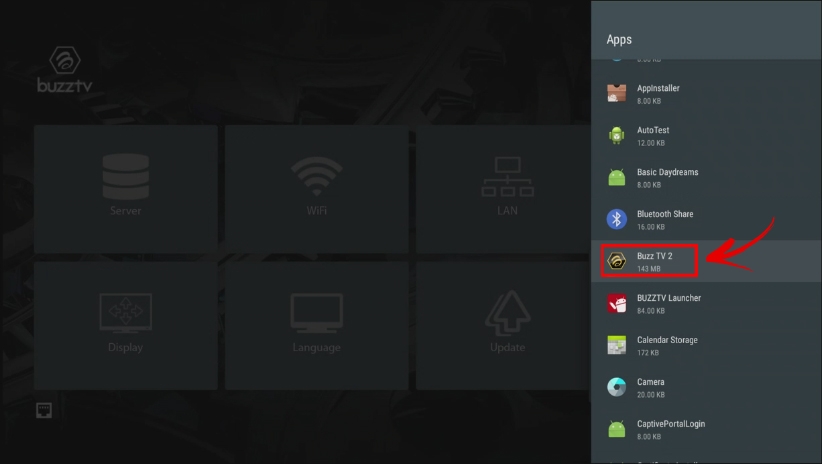
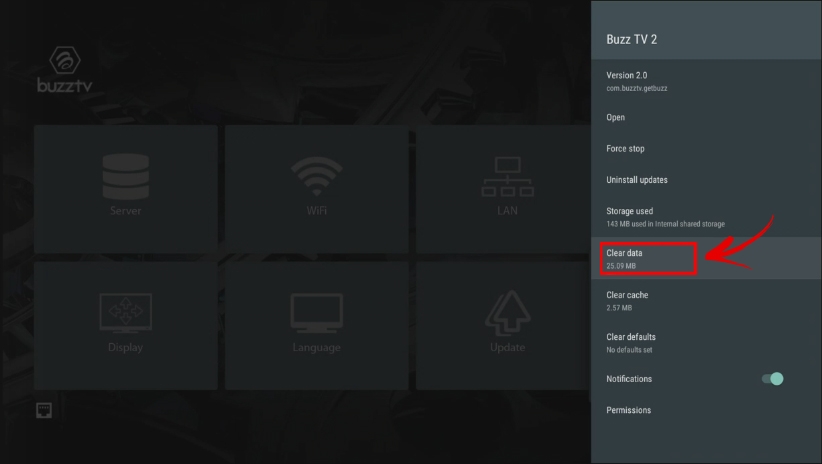
-
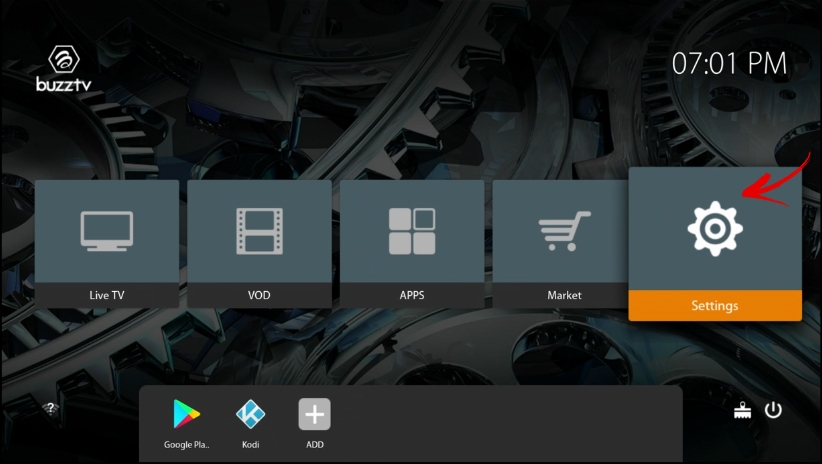
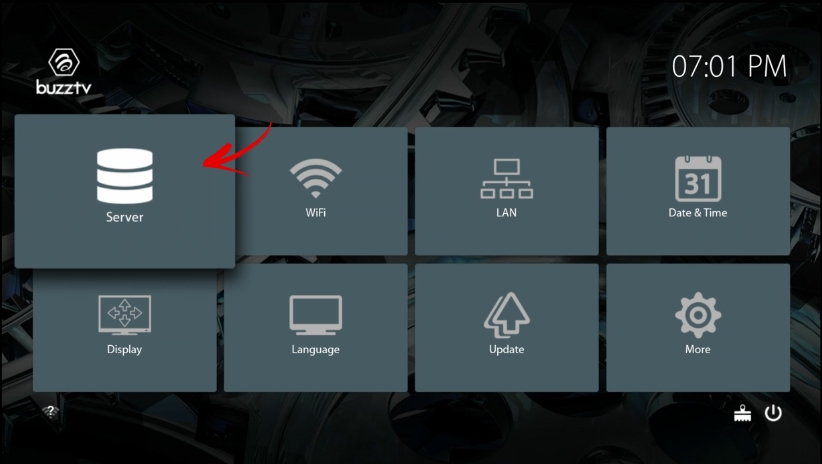
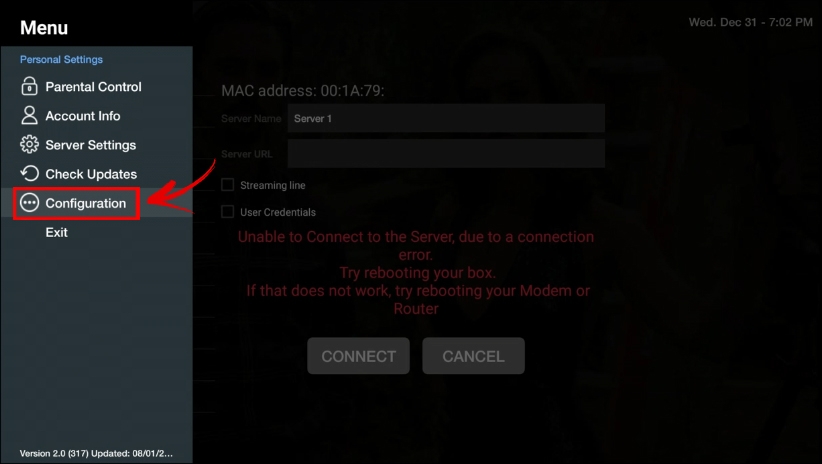
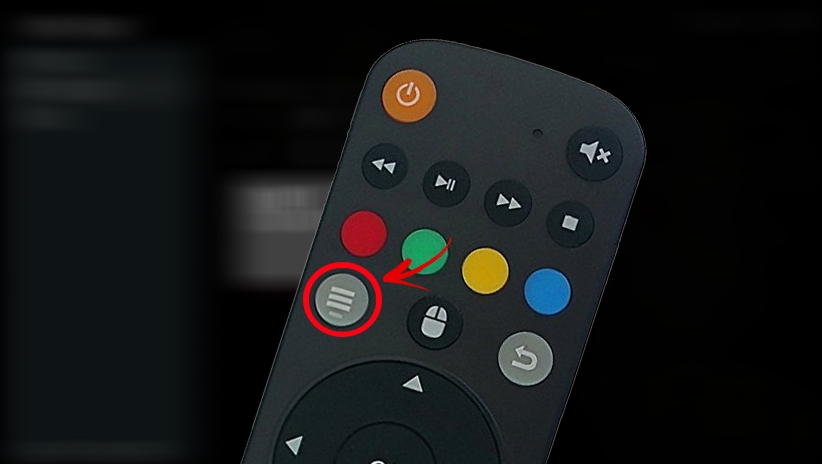
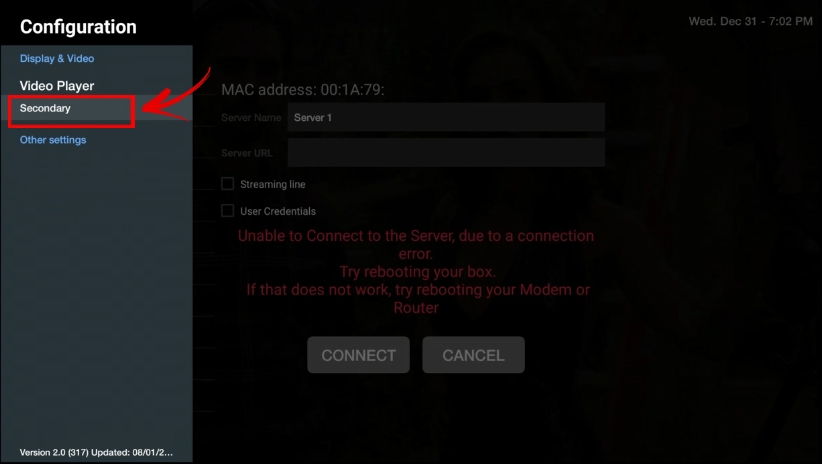
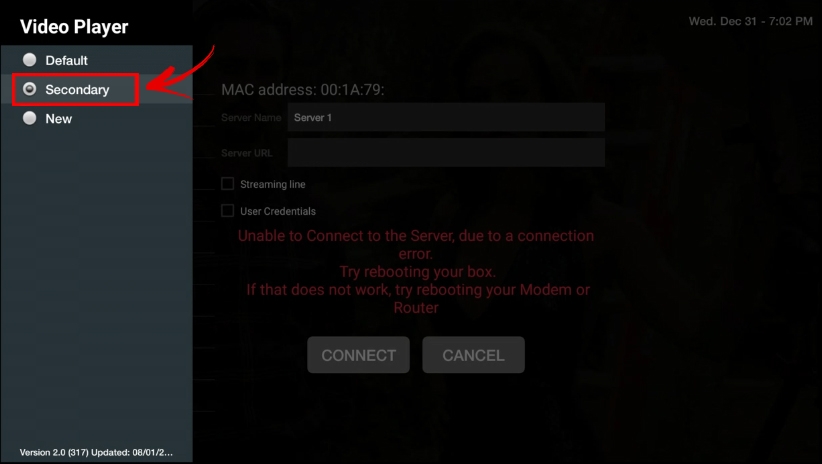
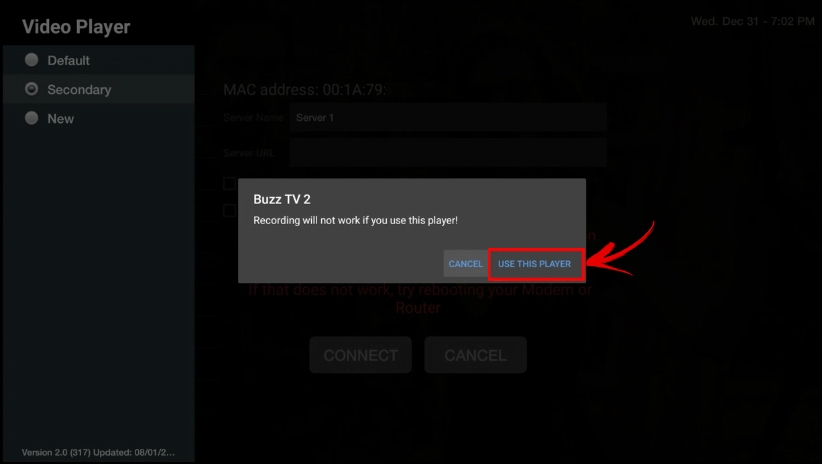
Follow these steps and it will help you fix right away. 1. Open app via Settings 2. Open Server 3. Press Menu button on your Remote 4. Select Configuration 5. Select Video Player 6. Select 2nd Player 7. Select ( Use this Player ) Then Click on Connect and you are good to go.
-
you need to trouble shoot your home networking, we have no support for Modems // routers, but to help you out little bit. - check to make sure your PC and your Buzztv box is connected to same router, Wired or wireless. - Shared Folder on your PC is visible, and to trouble shoot that you need a phone or another PC to check. for more trouble shooting material check with people that are good in networking. If your PC // Share folder // is visible on your network buzztv or apps you mentioned should be able to see it easily.
-
I read on your other posts the xpl3900 is fixed. is the remote fixed too?
-
To remove the icons which are on this list, you need to select the app hold OK button 3 to 5 Seconds and you will see a popup to remove YES or NO, Select YES.




.jpg.2ce677525de943af6e46b893c4dd7e3d.jpg)
.jpg.a8a1ae809a4e44bb556d31ab00704b0d.jpg)
.jpg.d75a783a8b4a17efa87b28f771fddc63.jpg)
.jpg.3847659f0133771c4b6eff5758f3b58e.jpg)
.jpg.c7f9465466302f9b57759f8d4ef3babe.jpg)
.jpg.47d50d0e23ad5630573fbb3855349e38.jpg)
.jpg.2347ec2ced341d1a83c8e843a7515bab.jpg)
.jpg.44a90272bc4e9b7a27732c80a3a7893a.jpg)
.jpg.ce559628e746cacda780bfb4e28c7ff2.jpg)
.jpg.940edd4dc324c21205c59e8d7f590040.jpg)
.jpg.158c7a56936021443c9f3e32559d66ce.jpg)
.jpg.4a7bc3fd861ce0a42ad6ee5e72491bdf.jpg)
.jpg.a3a50a3cf6f2c8803a0af4ae687eaace.jpg)
.jpg.0b0f6003527fbb245a127a3df7563e94.jpg)
.jpg.aa2e0c636487559c70223e23f3373b35.jpg)
.jpg.a045f49f6cccad5b6ae87fd1170c6dc9.jpg)
.jpg.8cf1f8e34989697b4f08e0b1057f13fd.jpg)
.jpg.ea4ba26b5a1ae6025d5647fe2fc14075.jpg)
.jpg.8beb5971523d7185427f61c58da5c9ca.jpg)
.jpg.b2ed3ef7758fd34507b35764e5086566.jpg)
.jpg.81f84e467723ccb7ed6a938468f37d13.jpg)
.jpg.313b47f0948bdbb0dea66f81c5e5f3d5.jpg)
.jpg.4299a7ee268d1606a2d4e3de44084c15.jpg)
.jpg.f95fe374ca94acb0fc4ed1f28bffc17d.jpg)
.jpg.049d66c236f6b482398601accfb21b8b.jpg)
.jpg.4821451d9bdda770814cf60a1aa2e0d7.jpg)
.jpg.521d34464d471bf7924982cc39bb9597.jpg)
.jpg.ec417417a13727e54622641b46dfd286.jpg)