MaxArk68
Members
-
Joined
-
Last visited
-
Thanks @Emporium for your analysis. I guess this isn't doable. 😞 I appreciate everyone's effort!
-
When I plug into the PC, it gets recognized. Type: CD Drive, File System UDF, Is this what you are referring to?
-
Thank you for your support. Ah. No, it isn't recognized there. Just the internal device storage shows.
-
Hi @dishuser. I'm going to declare my ignorance here. I'm not sure what you mean. My guess in no as I have no idea how to.
-
I have an XRS4500 Max. Is it possible, and if so how, to connect my portable USB DVD drive to my device to watch DVD media through the media box? I've plugged the DVD drive into the media box's USB port thinking I might be able to access the disk's content through VLC or a file manager, but it appears as though the hardware isn't being recognized.
-
Yes ... and it's easier when the batteries in the remote are strong. (am I the only one that feels the BT-100 remote is hard on batteries?)
-
Disregard. Found the answer.
-
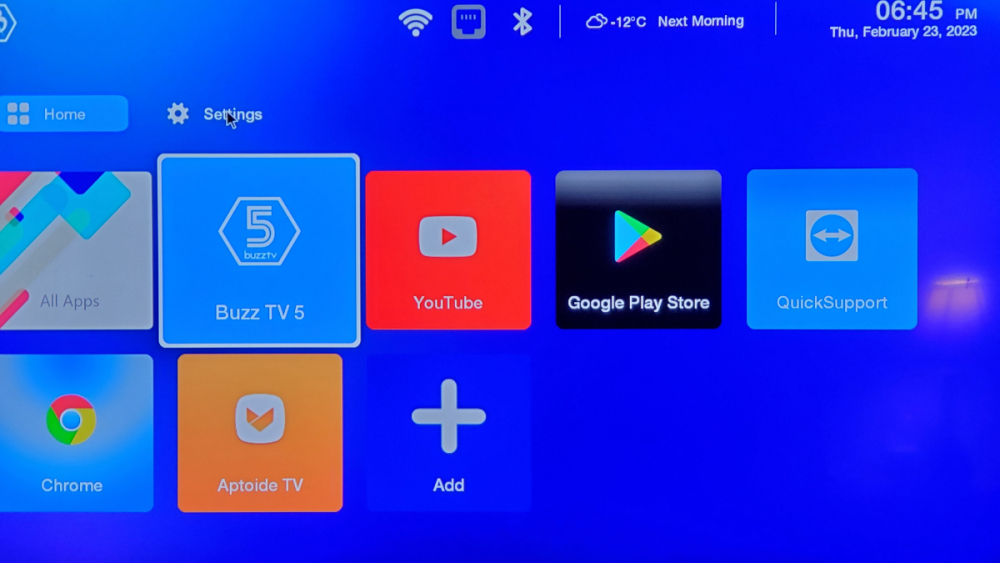
I'm in a pickle. Whn playing around looking at the different themes, there was 4 ... Classic, MediaPlayer, MediPlayer 2 and Modern. BuzzTv defaults to Modern. I selected MediaPlayer 2, and was not impressed, sowanted to revert back. There is a settings "button", whic I assume is where you would access the settings to change it, however, I cannot get the button to do anything. I can't use the controller direction arrows to select it, I can't use the pointer to select it. Please ... how do I access the settings if the button isn't accessible? (image attached)
-
Thank you all for your replies. Although I was putting the remote in pairing mode (pressing but not holding the buttons), I was doing it from the wrong settings page. I was going throughthe remote setting in the BuzzTv settings, not the system settings for the remote (where the option to pair was). Once I found that everything you folk enlightened me on made sense.
-
I just recently got my XRS4500 MAX configured and it's working splendidly, however, I am struggling to pair the remote that came with it. On first starting up the Buzz box, I was prompted to pair the remote. "OK" and "Volume down" button got the remote's LED slowly blinking. Eventually it stopped. There was no idication as to whether the remote paired or not. Each time after I restarted the Buzz box, the same thing happened. Prompted to pair, did the button combination, LED blinked for a period then stopped. In all cases, the message was that the remote was "scanning..." inthe bottom left corner. At one point I interrupted the process, at which time I was asked if I wanted to stop pairing and that the remote would be IR mode if I did. I don't believe I ever paired the remote with bluetooth, but it does work in IR mode. When I go to BuzzTV setting and select "Remote Control" (where the option to disable backlighting can be found) i get the message "No BT-400 is paired." I have continued to pair the two, but what should I be watching for to indicate a successful pairing. I keep trying but the LED stops blinking. Does that indicate successful pairing (hasn't in initial attempts), or do I have to keep trying until "something" happens to indicate successful pairing?
-
Push pin and hold. Plug in power to back of machine (only way to power off machine - remote does nothing to power on or off box) Nothing ... just an orange and red indicator LED. I think it's dead. (for a few weeks anyway, then it will be like a Phoenix and rise from the ashes again)
-
No. There is nothing to choose from. The screen is dark, there's no video signal.
-
If that is the same as what dishuser suggested in post 2, then yes. (the hidden button on the underside of the unit) No resolsoution currently. It has worked in the past, but that may have been just coincidental. Its not doing anything now.
-
Hi dishuser, I continue to have this issue, and at one point, I felt this had been the solution as I had been having intermittent success with it. I'm wondering if its a hardware issue, or an operating system problem that could be resolved by reflashing if thats even possible.
-
I have a BussTV XP3000. It has started to act oddly. For the past few months, it has started to randomly reboot itself. It doesn't appear to be related to any particular app. After it reboots, it will continue to recover, however, after a while, it stops doing that and all I'm left with is a box with an orange and red led light sequence. It doesn't recover from this. If I unplug it, and shelve it for a few weeks or a month, and plug it back it, the box will work fine. Soon, it starts to demonstrate the same behaviour again. Thoughts? Sadly, I don't have the sales receipt any longer.