

Stugots
Administrators
-
Joined
-
Last visited
Everything posted by Stugots
-
Note: This steps are not meant to be for everyone, just some people that are having issue and temporary wants to down grade the current version to previous buzztv app version, which you had before the update. 1. Select Settings 2. Select More 3. Select Apps 4. Under system Apps Select Buzz TV 2 5. Select Uninstall Updates 6. Click OK 7. You will see a White Popup Select OK And you are done, Then press back till you are back on main screen.
-
Note: This steps are not meant to be for everyone, just some people that are having issue and temporary wants to down grade the current version to previous buzztv app version, which you had before the update. 1. Select Settings 2. Select More 3. Select Apps 4. Under system Apps Select Buzz TV 2 5. Select Uninstall Updates 6. Click OK 7. You will see a White Popup Select OK And you are done, Then press back till you are back on main screen.
-
Note: This steps are not meant to be for everyone, just some people that are having issue and temporary wants to down grade the current version to previous buzztv app version, which you had before the update. 1. Select Settings 2. Select More 3. Select Apps 4. Under system Apps Select Buzz TV 2 5. Select Uninstall Updates 6. Click OK 7. You will see a White Popup Select OK And you are done, Then press back till you are back on main screen.
-
Note: This steps are not meant to be for everyone, just some people that are having issue and temporary wants to down grade the current version to previous buzztv app version, which you had before the update. 1. Select Settings 2. Select More 3. Select Apps 4. Under system Apps Select Buzz TV 2 5. Select Uninstall Updates 6. Click OK 7. You will see a White Popup Select OK And you are done, Then press back till you are back on main screen.
-
-
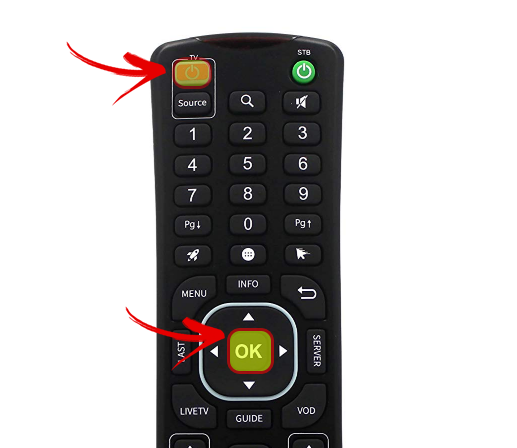
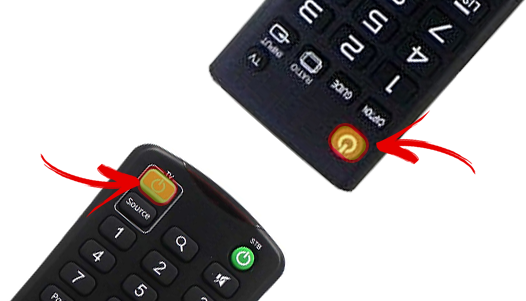
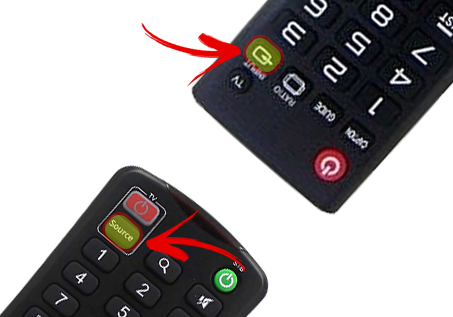
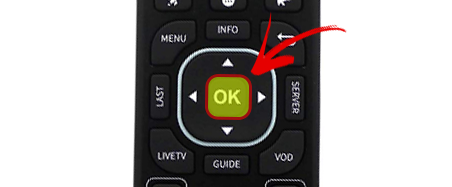
Here is a Video showing you how it is processed. IR remote How to program TV or Source keys 1.Press and hold TV+OK for 3s till LED turn solid on and RCU enters learning mode 2.Press the key to be programmed on this RCU. LED begins blinking 3.Aim the TV RCU towards the front of this RCU(distance less than 3cm)Press the button on the TV RCU,if the STB RCU is programmed correctly,the LED will flash 3 times then turn solid on 4.Repeat steps 2-3 for other keys 5.Exit learning mode by long pressing OK button for 3s,LED flash twice then turn off
-
-
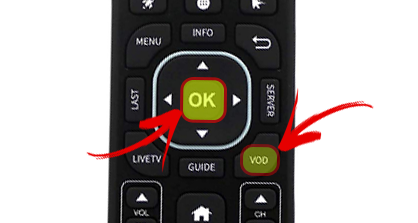
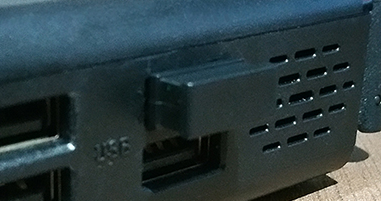
1. Press OK+VOD for 3s till LED light up 2. RCU enters Pairing Mode, keep the distance between the RCU and the USB dongle within 30cm, 3. insert the USB dongle into the device, 4. LED flash 3 times then turn off, means pairing succeed. The pairing mode will only last for 30s, please finish all the steps within the time limitation.
-
-
-
Buzz TV Version 2.0 (317) App Change log: New Features: - Added new sort options + menu to all Live TV Categories + EPG - Added feature to sort organized favorites in Live TV by Name or #, so you can reorganize them after. - Added new sort options to Live TV Favorites - Added Live TV Icon next to channel name if that channel is currently being played on the categories list. - Category Name now appears at the top of all Live TV + VOD + TV Series Menus - Added New Player for VOD/TV Series as main player. - Added New Player for Live TV with Recording feature. - Removed Old Player + Internal Player - Added support for Streaming Line from Xcodes Portals in Server Settings Menu - Added support for M3U Playlists in Server Settings Menu - Optimized app for better performance - Optimized channel changing speeds for faster channel changing Bug Fixes: - Fixed issue with catch-up and favorites category, it will now always stay in favorites category after watching a catch-up program - Fixed when stopping a catch-up program, you will now be brought back to time you just watched - Fixed some VOD + TV Series Favorite's issues - Fixed binge watching on TV Shows/TV Series - Fixed EPG Offset - Fixed a Resume Feature bug on VOD + TV Series - Fixed some bugs from Version 247 - Fixed a portal loading bug - Fixed Cannot play TV Series Episode after pressing info button - Fixed Auto Shut off feature - Fixed Organized Favs disappears after exiting app and reloading it. - Fixed EPG Show Information bug/not showing EPG show description for all channels - Fixed an issue with catch up not playing the next program after the first one ends - Fixed an organized favorites bug when using grid EPG - Fixed Closed Captioning issue on Secondary Player - Fixed Closed Captioning issue on VOD/TV Series with New Player. - Fixed a Dynamic URL issue on Catch-Up that caused some links not to play. - Fixed an issue with IPTV Panel Portals not working
-
Buzz TV Version 2.0 (317) App Change log: New Features: - Added new sort options + menu to all Live TV Categories + EPG - Added feature to sort organized favorites in Live TV by Name or #, so you can reorganize them after. - Added new sort options to Live TV Favorites - Added Live TV Icon next to channel name if that channel is currently being played on the categories list. - Category Name now appears at the top of all Live TV + VOD + TV Series Menus - Added New Player for VOD/TV Series as main player. - Added New Player for Live TV with Recording feature. - Removed Old Player + Internal Player - Added support for Streaming Line from Xcodes Portals in Server Settings Menu - Added support for M3U Playlists in Server Settings Menu - Optimized app for better performance - Optimized channel changing speeds for faster channel changing Bug Fixes: - Fixed issue with catch-up and favorites category, it will now always stay in favorites category after watching a catch-up program - Fixed when stopping a catch-up program, you will now be brought back to time you just watched - Fixed some VOD + TV Series Favorite's issues - Fixed binge watching on TV Shows/TV Series - Fixed EPG Offset - Fixed a Resume Feature bug on VOD + TV Series - Fixed some bugs from Version 247 - Fixed a portal loading bug - Fixed Cannot play TV Series Episode after pressing info button - Fixed Auto Shut off feature - Fixed Organized Favs disappears after exiting app and reloading it. - Fixed EPG Show Information bug/not showing EPG show description for all channels - Fixed an issue with catch up not playing the next program after the first one ends - Fixed an organized favorites bug when using grid EPG - Fixed Closed Captioning issue on Secondary Player - Fixed Closed Captioning issue on VOD/TV Series with New Player. - Fixed a Dynamic URL issue on Catch-Up that caused some links not to play. - Fixed an issue with IPTV Panel Portals not working
-
-
re-download the firmware and try again. this should solve the issue.
-
located at the bottom of the unit.
-
did you download from here http://stbtalk.com/applications/core/interface/file/attachment.php?id=4 ?
-
-
either you have a old version of buzztv app (go to menu, check for update) or your box memory is almost full. go into android settings to see how much memory you have available
-
try re-downloading the firmware here
-
try re-downloading the firmware here
-
try re-downloading the firmware here
-
try re-downloading the firmware here
-
try re-downloading the firmware here
-
try re-downloading the firmware here
-
try re-downloading the firmware here

