

allaboutbuzz
Moderators
-
Joined
-
Last visited
Everything posted by allaboutbuzz
-
NEW UPDATE V973 Oct 15th, 2026 Changes: - Live TV Bug Fixes - PVR Bug Fixes - Server Bug Fixes - VOD Bug Fixes Sent to all Android 9, 11 and 13 Boxes running Buzz 5 Please leave feedback below Thanks
-
BuzzTV Mobile App Update Version 1.0.19 Release Notes: We are excited to roll out the latest update for the BuzzTV Mobile App! You can now cast to your TV and keep watching in Picture-in-Picture on both Android and iOS. Live TV navigation and the EPG are also improved, along with a number of fixes for a smoother experience. 🆕 New Features Added New Feature: Casting: You can now send VOD and TV Series content from your phone to your TV with Chromecast. Live TV casting works on HLS streams. Many servers only allow one connection at a time, so playback on your phone pauses while you’re casting, and an on-screen message shows that casting is active. Added New Feature: Picture-in-Picture (PiP): Keep watching in a small floating window when you go to your phone’s home screen or open another app. Works on both Android and iOS. ✨ Improvements Added Channel Navigation Arrows: The arrows for moving between channels in Live TV are back. Improved Full-Screen Button in the Channel List: The full-screen button in the channel list is now easier to tap. Updated Android App Icon: The app icon on Android now displays correctly. 🛠️ Bug Fixes Fixed Live TV Channel Info After Switching: The full-screen Live TV player now updates the channel title and logo when you switch channels. Fixed Live TV Screen Layout: The Live TV screen layout now looks the way it was designed. Fixed Missing EPG in Channel List: Program guide info shows in the channel list again. Fixed Full-Screen EPG Button: The full-screen EPG button works again. Fixed Live TV Navigation Reset: Live TV now keeps your place when you move around the app, instead of resetting. Fixed Missing TV Episodes on MAC Servers: TV Series episodes from MAC Portal servers now show up correctly. Fixed TV Series Back Navigation: You can now go back to the previous screen after opening a TV Series. Fixed Search Result Playback: Content you open from search results now plays correctly. Please Leave Feedback Below Apps can be found on the App Stores Apple: https://apps.apple.com/us/app/buzztv-mobile/id6756312224 Android: https://play.google.com/store/apps/details?id=com.buzztv.iptv.mobile
-
Added on V19 sent yesterday to both Android and iOS
-
This has been fixed
-
They do silent updates in the background And they are by region. Users never see the updates. And you can just program the remote buttons for what you want to do in settings.
-
Should go out publicly by next week
-
Its supported on our App/Buzz 6 home screen. We use Google/Android TV are the front end though Which does not allow PIP on that OS on the official versions of Google TV The other boxes running AOSP would essentially allow this, but you would be mostly using Mobile apps
-
I PM you a reply
-
This was fixed today actually Was a file error from the OTA server. That wasn't cache properly on some boxes So it should update now.
-
Thanks for the suggestion, its something we can look into for a future update
-
Are you referring to the Buzz 6 app or the Google TV box itself?
-
Fixed and sent on V362 today
-
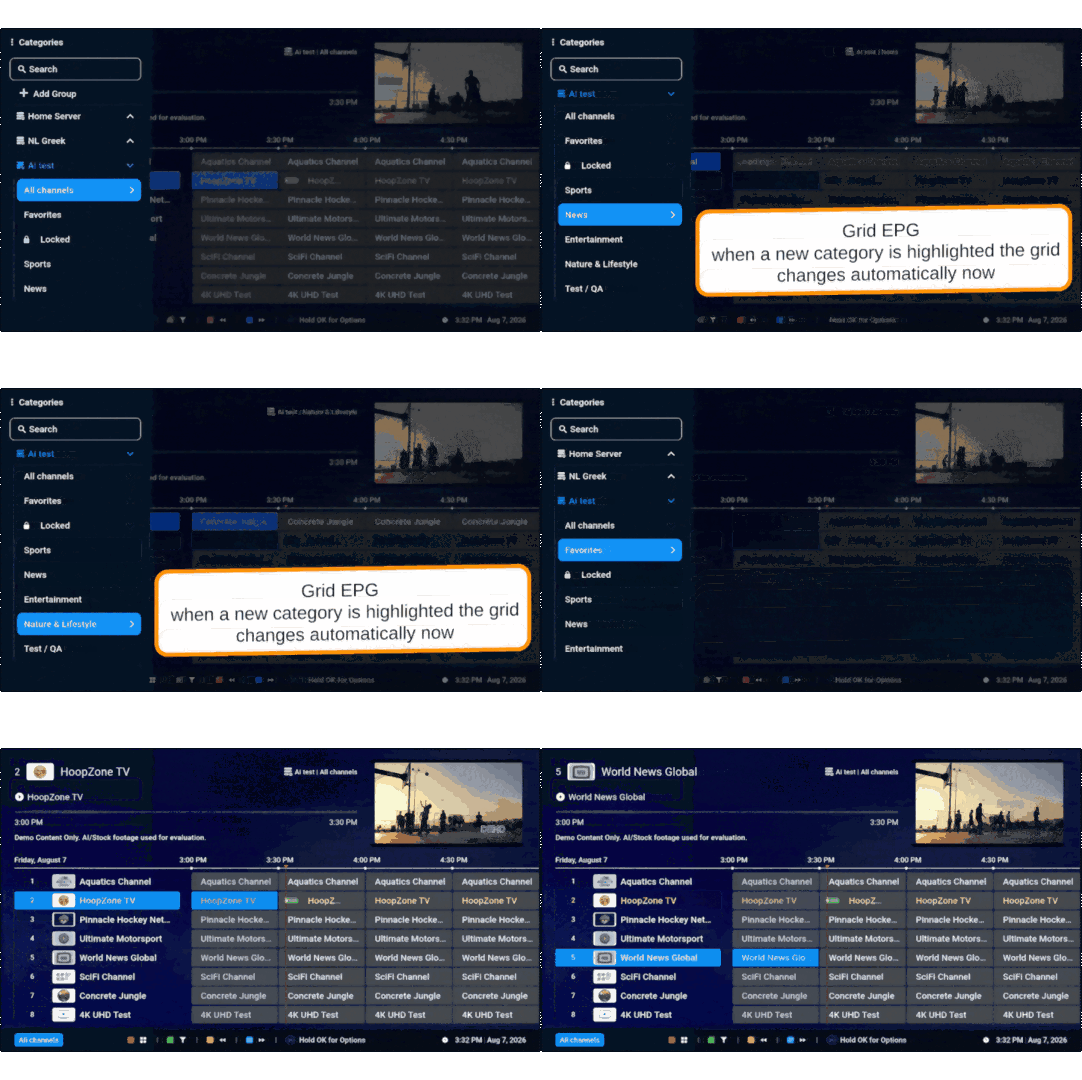
L1 Series Update Firmware Changes System Stability: Fixed an issue where the Screen Position settings were not saving after a reboot. Optimization and stability fixes. App Changes Performance Optimization: Significantly improved navigation and UI responsiveness on 4K displays. Enhanced performance when long-pressing the D-Pad to scroll through menus quickly. Grid Guide: Implemented dynamic category updates during scrolling. Mac Server Support: Fixed the Expiration Date visibility for Mac servers. YOU CANNOT REVERT BACK TO PREVIOUS VERSION ONCE INSTALLED. *UPDATE WILL APPEAR 1 HOUR AFTER BOOTING THE BOX OR AFTER 2 HOURS IF BOX IS LEFT ON** **FIRMWARE UPDATES ARE SEPARATE FROM APP UPDATES** **BOX WILL REBOOT TO FINISH INSTALLATION** PLEASE LEAVE FEEDBACK BELOW
-
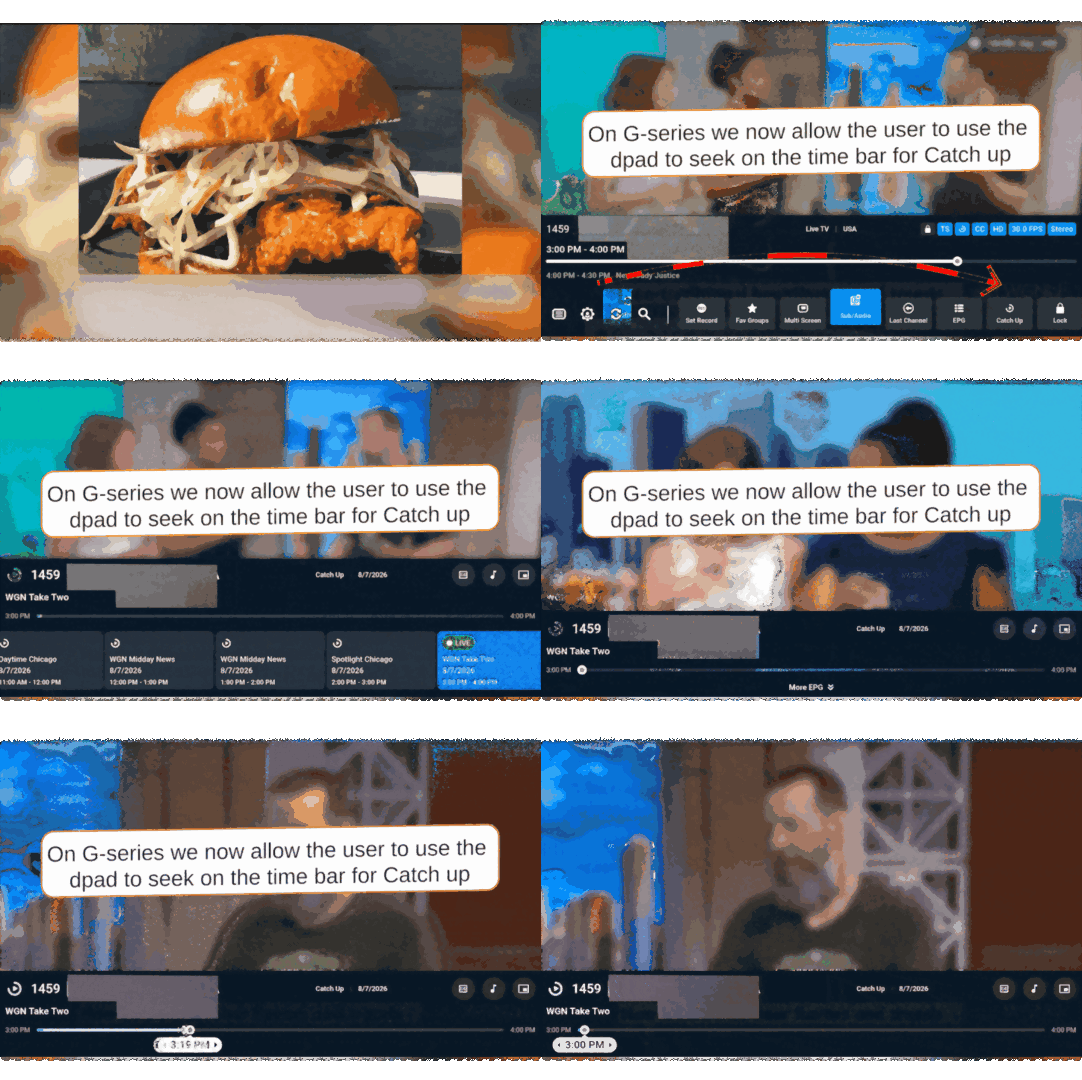
Buzz 6 App Update for P6 and Classic AI V362 Official Update Aug 17th, 2026 YOU CANNOT REVERT BACK TO OLD VERSION AFTER TAKING UPDATE. Changes: Classic AI and P6 Update New Features D-Pad Navigation: Integrated D-Pad seeking functionality for Catchup and LiveTV Info Bar. Bug Fixes Audio Stability: Fixed missing audio issues reported on specific Live TV channels. UI/UX Improvements: Grid Guide Categories now update correctly during scrolling. Fixed Subtitles automatically enabled in Live TV. Corrected the display of Expiration Dates for Mac-based servers. Please leave feedback below
-
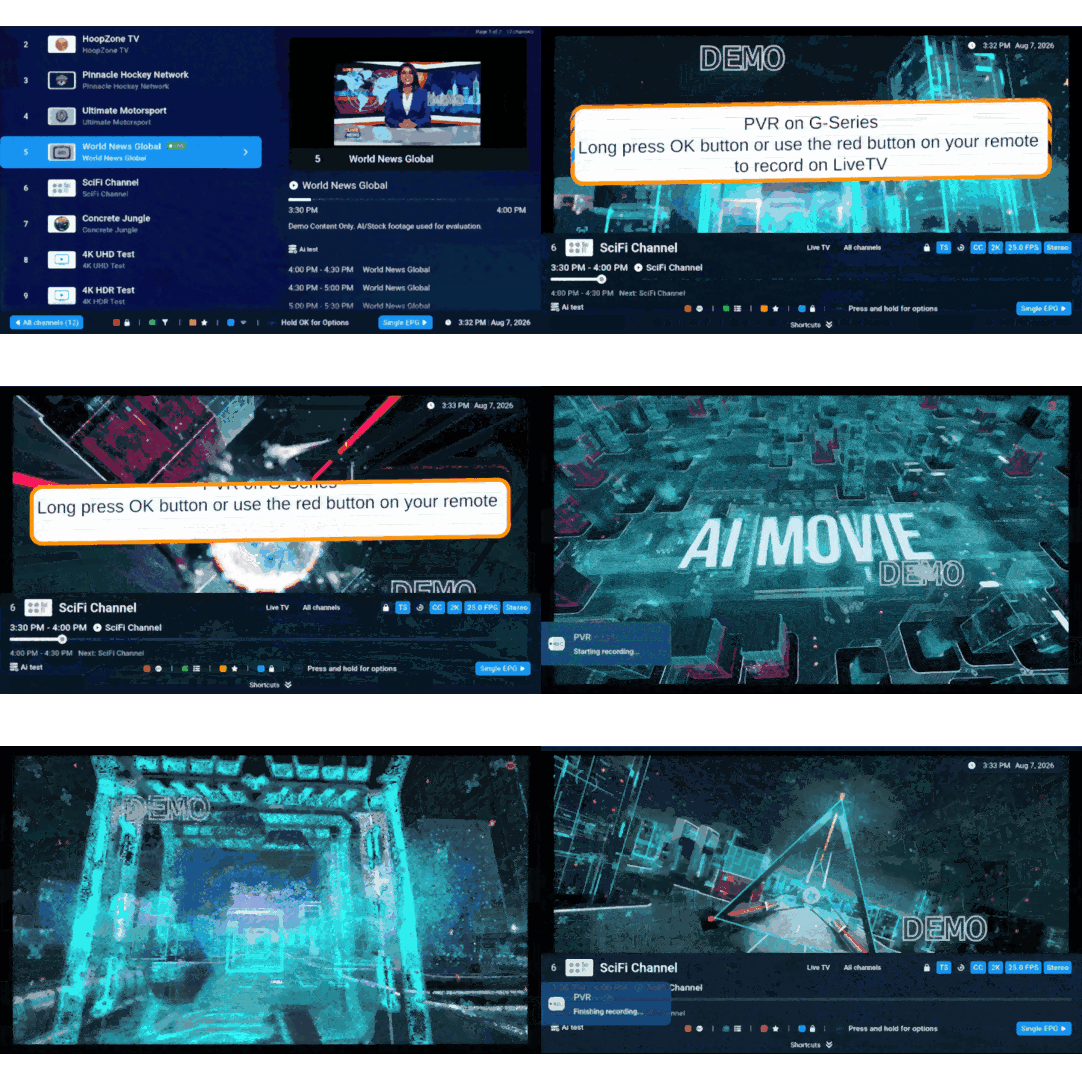
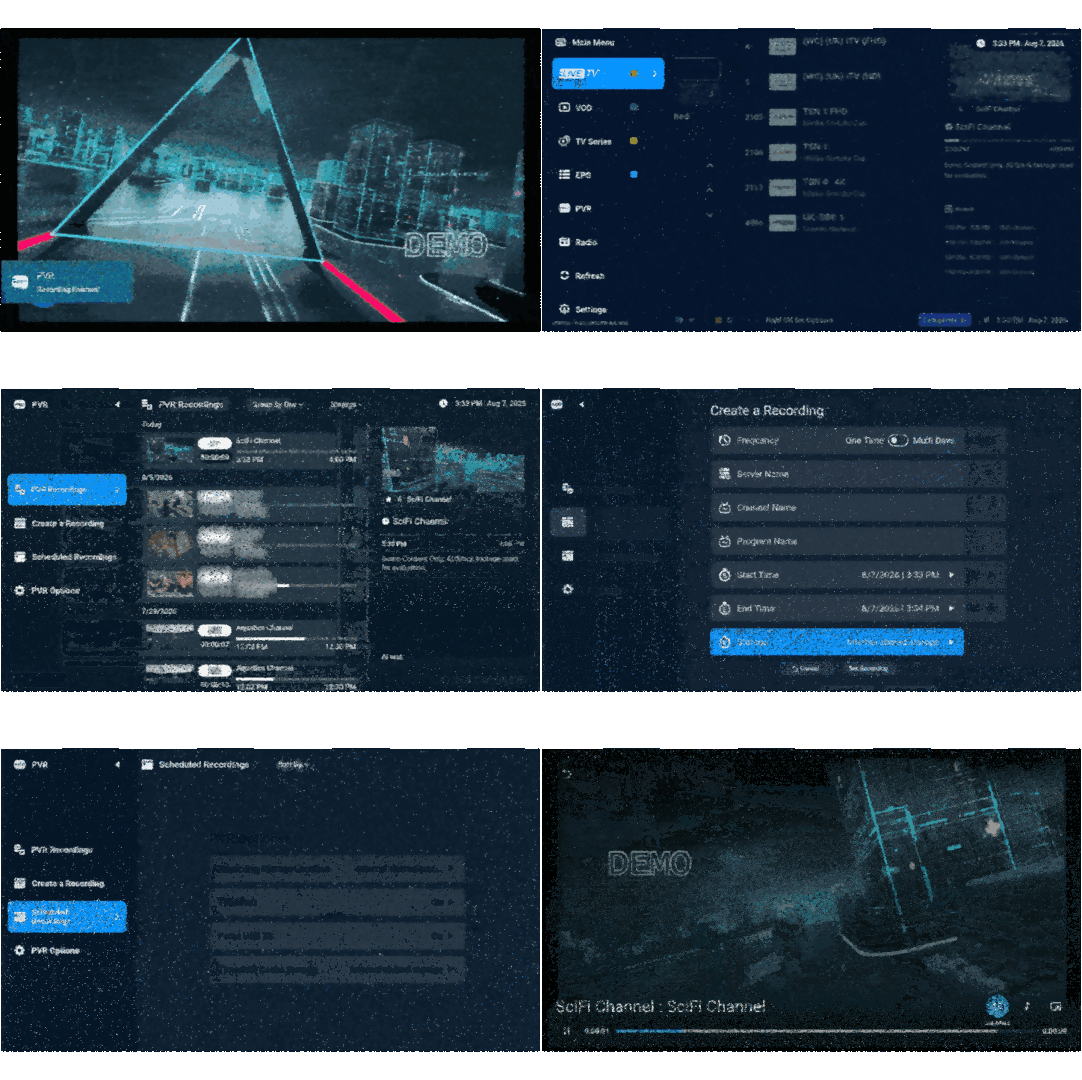
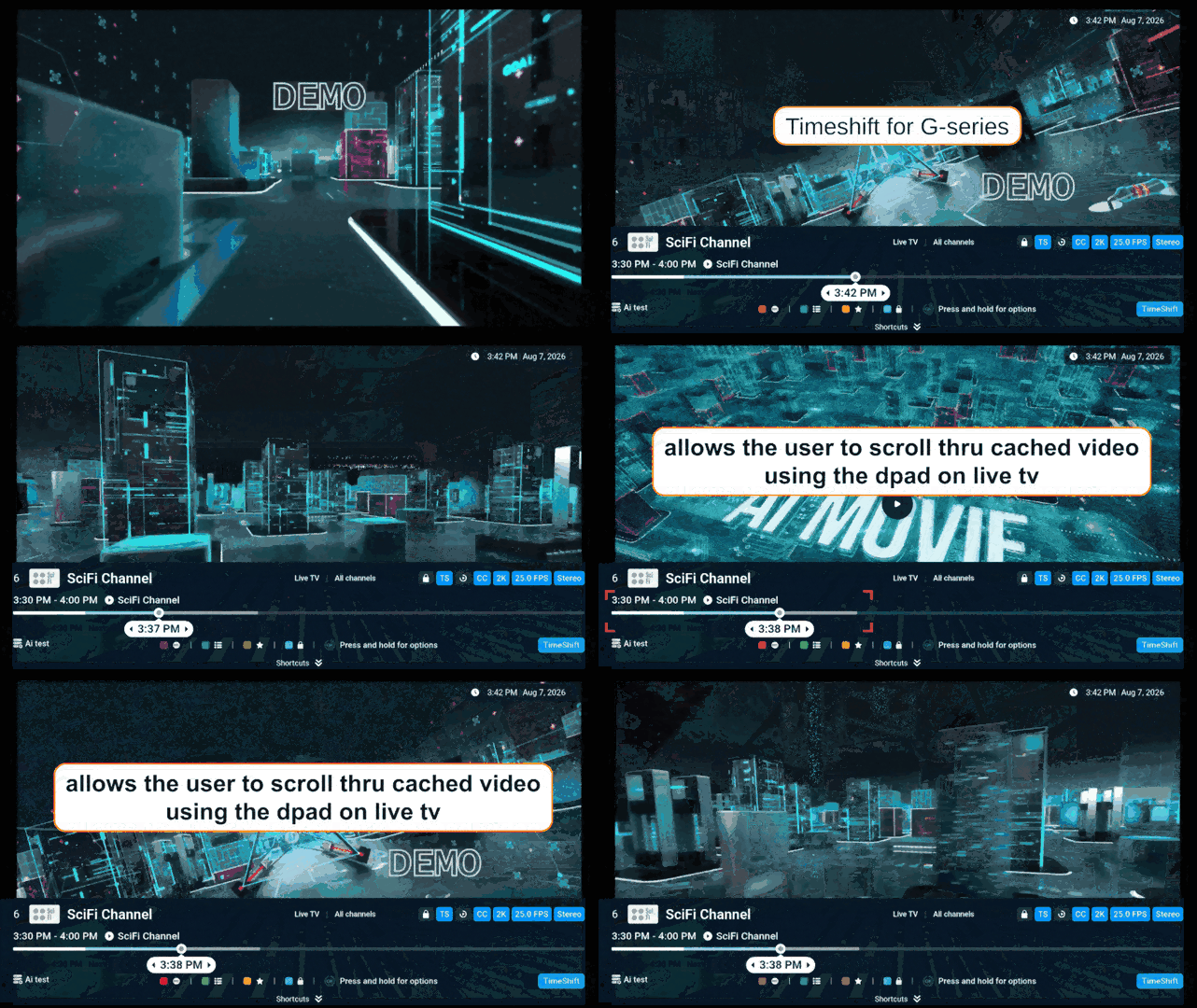
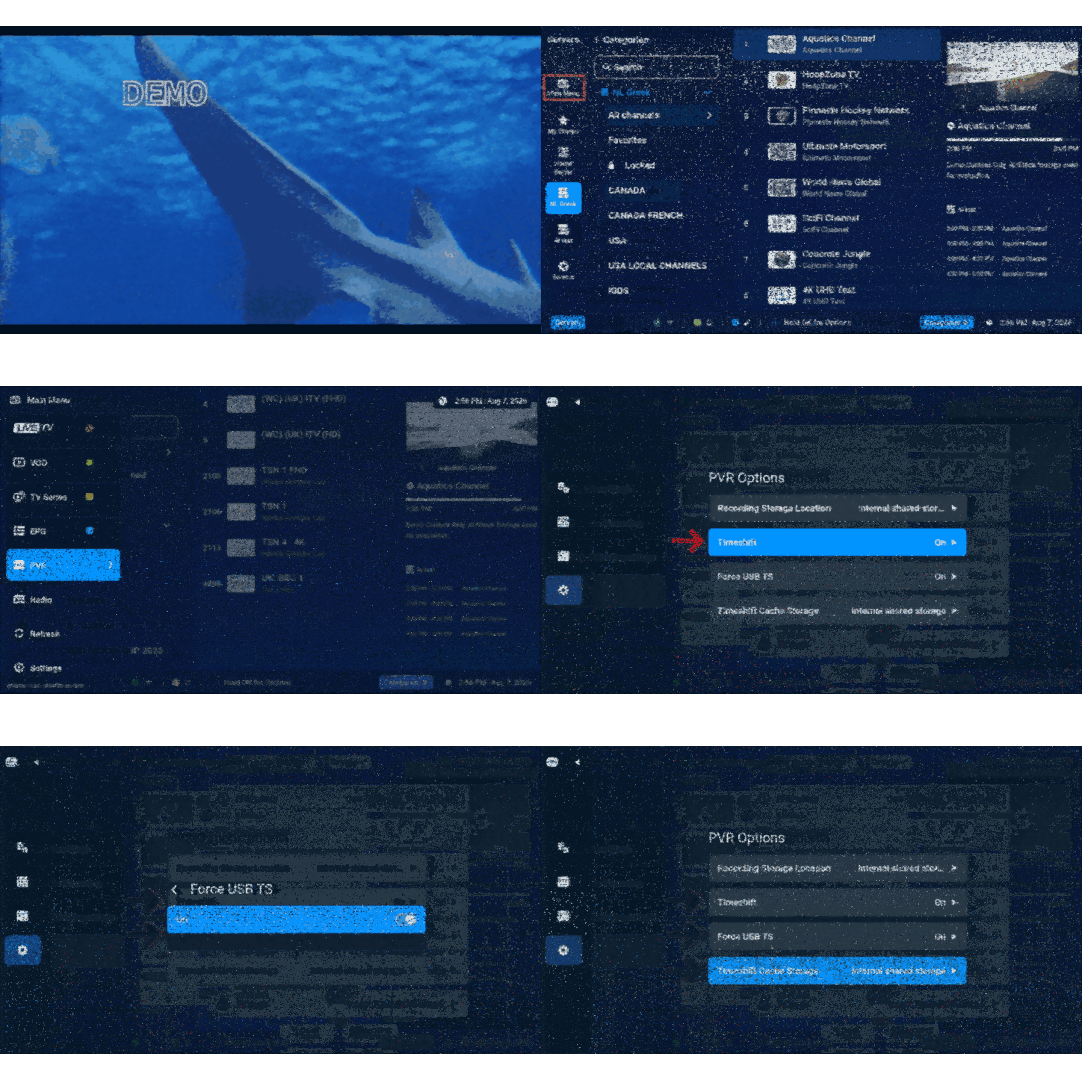
**NEW** Buzz 6 App Update for G-Series V361 - Aug 17th, 2026 AVAILABLE NOW IN THE PLAYSTORE FOR ALL G-SERIES BOXES New Features & Enhancements PVR Support for LiveTV: Comprehensive support for Personal Video Recording on Live TV channels. PVR Recording + Pvr Settings Gifs TimeShift Support: Pause and rewind live broadcasts. Access this feature via Main Menu > PVR > PVR Options. TS Settings + TS Seeking Gifs D-Pad Seeking On Catch Up: Added support for seeking using the D-Pad on the Catchup and LiveTV Info Bar. CatchUp - Gseries gif Dynamic Grid Guide: Categories now update dynamically as you scroll through them. Grid categories gif Bug Fixes Subtitle Logic: Resolved an issue where subtitles would automatically turn on in Live TV. Server Compatibility: Fixed a bug where the expiration date was not displaying for certain Mac servers.
-
Never got it I only see a message from me asking for the url Got no reply from you on it since last Wed
-
And you didn't reply to my last message
-
Todays update in the Playstore fixes HDR
-
Blue is ON Green is internet
-
Yes it should resolve the issue above
-
Buzz 6 App Update for P6 V352 Official Update July 21st, 2026 YOU CANNOT REVERT BACK TO OLD VERSION AFTER TAKING UPDATE. Changes: ** - Fixed VOD + TV Series Playback Issues - Fixed PVR Not Opening - Fixed CEA-608 TTX + DVB Subtitles on Live TV - Fixed Playback on some HLS Streams on Live TV - Added New List View UI Feature to VOD + TV Series - Added Stream Data info to Info Bars of Live + VOD/Series - Fixed playback on some XC Servers - Fixed some crash bugs Please leave feedback below
-
The channel should already auto save your previous selection
-
Reboot the box and try again If using a VPN, turn it off as well
-
Sent 20 mins ago
-
NEW FIRMWARE UPDATE CLASSIC AI July 16th,2026 V20260701 UPDATE TAKES UP TO 20 MINUTES TO DOWNLOAD + INSTALL YOU CANNOT REVERT BACK FIRMWARE DOWNLOADS IN MULTIPLE PARTS CHANGES: - Update SDK version on BuzzTV Core and app installer - Update security patches up to and including June 2026 - Fixed Power Button - Fixed Audio surround options not being remembered Please leave feedback below

