allaboutbuzz
Moderators
-
Joined
-
Last visited
Everything posted by allaboutbuzz
-
NEW P6 Firmware Update July 16th, 2026 OFFICIAL UPDATE V20260701 Firmware Update WILL DOWNLOAD IN MULTIPLE PARTS YOU CANNOT REVERT BACK Firmware Changes: - Update SDK version on BuzzTV Core and app installer - Remove global key handling for Guide button. It will now function separately for Buzz 5 and 6 Please leave feedback below
-
BuzzTV 6 IPTV App Update Version 347 Update Now Available in the Play Store for the All P6 Models + Classic AI Changelog: We are excited to roll out the latest update for the BuzzTV 6 IPTV App! This release focuses on improving your content discovery with brand-new viewing modes, enriching the on-screen information layout, and fixing critical playback and subtitle issues for a smoother streaming experience. New Features & UI Enhancements Enhanced Navigation & Layouts Added New Feature: List View for VOD & Series: You can now toggle from the traditional grid layout to a sleek List View when browsing Video on Demand (VOD) and TV Series. This makes it much faster to scroll through large libraries and read longer titles at a glance. Added New Feature: Media Info on Info Bars: We’ve upgraded the user interface for the Live TV, VOD, and Series Info Bars. You can now see real-time media details (such as resolution, audio codecs, and stream type) directly on the overlay without needing to dig into deep settings menus. Added New Feature: Smart Genres for MAC & XC: Finding what to watch is now easier for users on MAC Portal and Xtream Codes (XC) configurations. The app now natively parses and categorizes VOD and TV Series into dedicated Genres, allowing you to filter content instantly. Bug Fixes & Performance Improvements Subtitle & Stream Optimization Fixed Live TV Subtitle Fixes: Resolved an issue where closed captions and subtitles would fail to render or fall out of sync. This update brings full, stable support back to CEA-608 (Closed Captions), TTX (Teletext), and DVB subtitles. Fixed HLS Stream Playback Stability: Fixed a bug that caused unexpected buffering, freezing, or playback failures on certain HLS (HTTP Live Streaming) streams during Live TV broadcasts. Stream loading should now be much more reliable. Please Leave Feedback Below
-
Because it was only sent for the G series on the Playstore. All our other models get the update directly via OTA. It should be sent out to Classic AI and P6 later today.
-
Not available right now Will be added on a future update
-
New Buzz 6 App Update for L1 V347 July 15th, 2026 YOU CANNOT REVERT BACK TO OLD VERSION AFTER TAKING UPDATE. Changes: - Added New feature: List View for VOD & Series - Added New Feature: Ui for media info to Live TV + VOD/Series Info Bar - Added New Feature: Genres Feature to VOD/TV Series for MAC + XC - Fixed EPG for some Mac Servers **Pop Up for Update will Appear or you can Check App Updates Manually. **App Updates are separated now from Firmware Updates. **App will Restart to Home Screen to complete Installation ** App will automatically install after 2 hours of no user input. PLEASE LEAVE FEEDBACK BELOW
-
Update was published on the Playstore to fix ttx and dvb subs + other new features and fixes were sent
-
BuzzTV 6 IPTV App Update Version 347 Update Now Available in the Play Store for the G-Series Changelog: We are excited to roll out the latest update for the BuzzTV 6 IPTV App! This release focuses on improving your content discovery with brand-new viewing modes, enriching the on-screen information layout, and fixing critical playback and subtitle issues for a smoother streaming experience. 🆕 New Features & UI Enhancements Enhanced Navigation & Layouts Added New Feature: List View for VOD & Series: You can now toggle from the traditional grid layout to a sleek List View when browsing Video on Demand (VOD) and TV Series. This makes it much faster to scroll through large libraries and read longer titles at a glance. Added New Feature: Media Info on Info Bars: We’ve upgraded the user interface for the Live TV, VOD, and Series Info Bars. You can now see real-time media details (such as resolution, audio codecs, and stream type) directly on the overlay without needing to dig into deep settings menus. Added New Feature: Smart Genres for MAC & XC: Finding what to watch is now easier for users on MAC Portal and Xtream Codes (XC) configurations. The app now natively parses and categorizes VOD and TV Series into dedicated Genres, allowing you to filter content instantly. 🛠️ Bug Fixes & Performance Improvements Subtitle & Stream Optimization Fixed Live TV Subtitle Fixes: Resolved an issue where closed captions and subtitles would fail to render or fall out of sync. This update brings full, stable support back to CEA-608 (Closed Captions), TTX (Teletext), and DVB subtitles. Fixed HLS Stream Playback Stability: Fixed a bug that caused unexpected buffering, freezing, or playback failures on certain HLS (HTTP Live Streaming) streams during Live TV broadcasts. Stream loading should now be much more reliable. Please Leave Feedback Below
-
-
We fixed TTX Subs today We submitted V347 to the Playstore for review, and once approved We can publish it for everyone to get the update Changes are as follows - Added New feature: List View for VOD & Series - Added Ui for media info to Live TV + VOD/Series Info Bar - Added Genres Feature to VOD/TV Series for MAC + XC - Live TV Subtitles Fixed for CEA-608 + TTX + DVB - Fixed Playback on some HLS Streams on Live TV
-
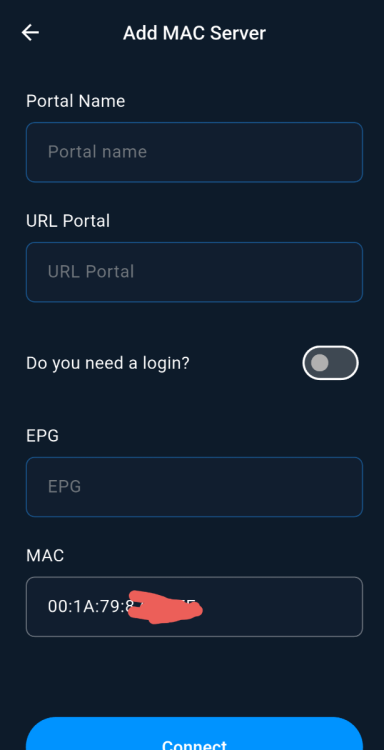
We already support MAC In server settings When you add a mac server if you think simply copying the mac from another device to the Buzz mobile app will allow you to share the same subscription. It's not that easy. As Emporium explained above.
-
I get that Still need to copy both device id 1 and 2 as well Even sometimes that doesn't work either
-
Yes we will add this in a future update Not sure what is preventing you from using the app without this feature though.
-
Will fix this on next Beta Update Thanks
-
CEA-608 and Dvb we're fixed on Thurs and Fri of this week Ttx we have to setup a virtual TV channel so we can fix it. Should be done next week And sent as an update hopefully next week as well.
-
Ok thanks for the information We will get it fixed DVB and TTX subs are like 15 years old and are european standards, so this is the first time anyone's reported this issue
-
We tried it here using Airpod Pro 3 No Pin came up And it worked no problem We did make sure to disconnect the Airpods from any other devices before we paired it to the box We put the airpods in pairing mode, then selected them as a device on Bluetooth settings on the Classic AI
-
Are subtitles listed in the subtitles menu? But just don't work when turned on? And if yes, can you upload a photo of what the options are
-
-
V330 is the latest public version of Buzz 6 for G series There are no betas released as of right now If you still see beta. It's because your email address is apart of the program still, as mentioned above.
-
New Update Buzz 6 App Update Official Update V1.0.336 June 25th, 2026 YOU CANNOT REVERT BACK TO OLD VERSION AFTER TAKING UPDATE. Changes: - Fixed Empty VOD List on some MAC Server - Added Genres Feature to VOD/Series for Mac and XC servers that support it - Fixed a bug with some playback issues on VOD/Series - Fixed a No Sound Bug - Fixed a bug when some movies would start paused - Fixed a bug when track list wouldn't update sometimes - REW/FF should be slightly faster now - Fixed the parser of CEA-608 subtitles, sometimes it could truncate parts of the text - Fixed a synchronization issue in subtitles - Fixed a bug when some channels or movies would start with a turned off audio - Fixed an issue when some CEA-608 subtitles would stay for long on the screen **Pop Up for Update will Appear or you can Check App Updates Manually. **App Updates are separated now from Firmware Updates. **App will Restart to Home Screen to complete Installation ** App will automatically install after 2 hours of no user input. PLEASE LEAVE FEEDBACK BELOW
-
Yes was turned on Will block any non g-series that downloaded it as well
-
Thanks for pointing it out It was a mistake on the Play Console for apps after we published V330 We will fix it
-
https://play.google.com/store/apps/details?id=com.buzztv.iptv.tv This is the Buzz 6 app on the Playstore for the G-Series only Its not a demo, beta or trial Its an official release
-
Buzz 6 App Update Official Update V1.0.334 June 23rd, 2026 YOU CANNOT REVERT BACK TO OLD VERSION AFTER TAKING UPDATE. Changes: - Fixed HLS with AAC audio - The app should now support HLS multiple video resolutions and multiple audio streams. - fixed saving/restoring previously selected tracks in Live TV (CEA subtitles) and VOD/Series - fixed a few possible crashes when Video Player switches tracks - fixed an issue which could cause REW/FF cause some temporary video/audio glitches - CEA-608 subtitles now have proper names in the UI, not just "Track 1" - fixed a few possible memory leaks when switching subtitles - Improved channel changing speeds **Pop Up for Update will Appear or you can Check App Updates Manually. **App Updates are separated now from Firmware Updates. **App will Restart to Home Screen to complete Installation ** App will automatically install after 2 hours of no user input. PLEASE LEAVE FEEDBACK BELOW
-
Its not Beta, were trying to figure out how to get that removed It seems when you use Internal Testing, Open Testing and Published to public via the Google Play console, it can affect the listing in the Play Store We will get it removed.