

allaboutbuzz
Moderators
-
Joined
-
Last visited
Everything posted by allaboutbuzz
-
How are you scheduling it exactly that this occurs? And what do you mean more than one EPG entry?
-
What version are you currently running? When in Live TV, Press Menu You will see the Version # listed on the bottom You can also check for updates manually by pressing Menu Settings Check Update.
-
Ok great to hear
-
Can you use the Backup feature in Configuration Save it to USB Then factory reset the box, Restore the file and try recording again. This video explains how to do a Reset Try this and let us know
-
Are you running the latest App Version 5.0.935? You can check when in Live TV Press the Menu Button The version # is listed on the bottom of the slide out menu If its not 935 Then select settings and go to check update. It should automatically download + install
-
-
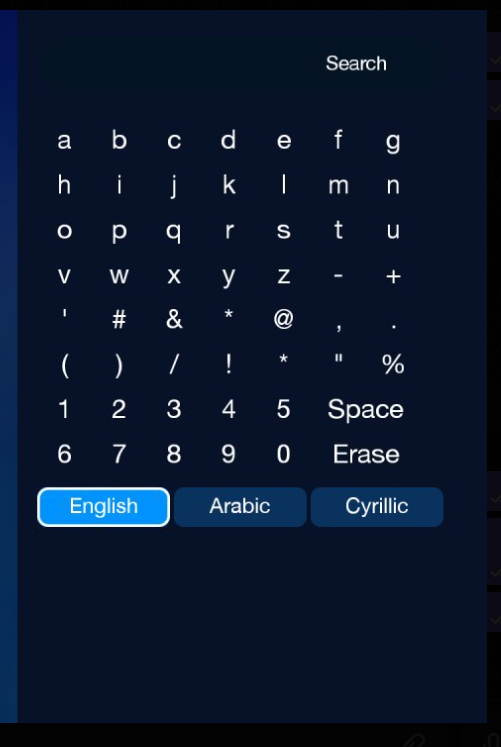
NEW BUZZ 5 APP UPDATE V935 - June 5th, 2024 SENT TO ALL BUZZ 5 USERS on Android 9 and 11 Devices. Changes: - Added extra characters to English keyboard in search - Updated weather API key on Modern Home Screen. To Fix Weather not Available error. - Fixed Fast Codes Bugs for XC - Clicking on a channel in search now opens info bar instead of channel list - Added password eye to "unlock channel" dialog - Added Back button Icon to Fav Groups - Minor Bug Fixes - Added Cyrillic Keyboard support to Search - Changed EPG to support -14 and +14 days of EPG and Catch-up. The server must support it to work. 14 Days will now be stored in the EPG Database. - Adult VOD no longer appears in the All Category + Search - Fixed missing descriptions on VOD - Fixed Navigation issues when scrolling through grid epg into the future times - Fixed a bug with TMDB in VOD - Added TMDB ID support to VOD & TV Series. If the server supports it. - Fixed a bug when changing Audio Tracks on Primary Player - Fixed Catch-up wouldn't play the next program properly after finishing - Fixed a crash when press TV series on remote and the current server doesn't have series - Fixed a rare crash in catch ip when server doesn't provide an info about when the recording starts and ends - Fixed a rare crash in Audio/CC menu - Fixed a crash in backup menus when user doesn't select anything to backup or restore - Fixed a rare crash on XC servers when account is inactive - Fixed a crash on MAC servers when server doesn't send user time zone to the app - Fixed a crash (all servers) when user enters an invalid url - Fixed a crash when the app checks if network connection is available and the app doesn't have required permissions Leave Feedback Below Thanks
-
Most TCL TVs don't offer IR Codes So that is probably why it doesn't work
-
If you turn on Real Time Streaming in the configuration menu, it should do what you're looking for on Live TV at least.
-
We will add : in place of the doubles for *
-
Emporium pointed out an error 2 * We will replace one with :
-
We will add more characters to the Search Keyboard on our next update Plus the Cyrillic keyboard, as this was requested by some European customers I think this should resolve your issue
-
Pretty sure they hardware decode it as they both have Dolby Licences So there is a difference between Hardware Decode and Passthrough.
-
To add to this Truehd cant be passthrough, its a bluray format, its decoded on players, some receivers can decode it but it cant be passed through, its a lossless format takes a lot on bandwidth
-
I apologize for the late response on this We looked into it atmos passthrough works fine.. truehd cant be passed through hdmi, bluray players decode it directly basically for atmos passthrough to work it needs to use EAC3 container. Which is what Disney+ uses for example.
-
Did you try rebooting the box? And try updating again
-
-
We have no way to detect if a movies been played on external player You can mark it played manually though.
-
When apps are active The screen saver won't work. That's even if you paused something. Sorry but we have no plans to change this.
-
Ok Auto uses HLS by default Try recording with TS and see if the same issues appear If not, then there is some testing we need to do with HLS
-
What stream format are you using in Configuration? Auto, HLS or TS?
-
Ok thanks.
-
Ok no problem. There's no point in going back and forth on this. As you already created a support ticket for the same thing and went back and forth on it there as well. You even mentioned that you didn't want to keep going back and forth. Yet here you are on our forums, doing the exact same thing. If there was something to fix we would, as we always do. V919 has been out since February, and obviously worked without issues for the server you mention. Looks like they updated or changed something on their side this week and broke something and they don't want to fix it.
-
Then how do you explain it doesn't work on Mag or Stb emu? It was tried on both. Your server broke something this week. That they're refusing to fix.
-
The update you're reporting on came out in February. And this issue only appeared this week. So the issue is on their side or they changed something this week and broke something. It's impossible an issue like this would go unreported for almost 2 months. If there was a problem we could fix. We would. We always have. And it was tried on stb emu + mag and both had the same issue. The log clearly shows the issue is on their side.



