Skip to content
View in the app

A better way to browse. Learn more.

BuzzTV Help

A full-screen app on your home screen with push notifications, badges and more.

To install this app on iOS and iPadOS
  1. Tap the Share icon in Safari
  2. Scroll the menu and tap Add to Home Screen.
  3. Tap Add in the top-right corner.
To install this app on Android
  1. Tap the 3-dot menu (⋮) in the top-right corner of the browser.
  2. Tap Add to Home screen or Install app.
  3. Confirm by tapping Install.

nbs.

Members
  • Joined

  • Last visited

Everything posted by nbs.

  1. once its populated it stays populated I go page up down page loads instantly
  2. Is fast epg on in settings? Have you emailed buzz with your info? How many services do you have? All the same?
  3. The initial epg loading takes awhile After that I have never had issues.
  4. nbs. replied to SteveD's topic in XRS4900
    did you pm allaboutbuzz?
  5. No you cant
  6. nbs. replied to TonyC's topic in XRS4900
    I use ipvanish
  7. nbs. replied to Diez's topic in XRS4900
    Have you tried it with vpn off?
  8. load this file https://mega.nz/file/CQNEybab#rF2YQmvphIB_5j7KTjdKnGYcvNw4_8yHzrASAXqAbLs
  9. Hit menu button and post version info at bottom
  10. nbs. replied to Diez's topic in XRS4900
    on the channels that you do get programming is the time correct
  11. nbs. replied to Diez's topic in XRS4900
    Hit the menu button while in tv configuration You will find epg offset there
  12. nbs. replied to Diez's topic in XRS4900
    Hold power button down and select restart Also go into menu settings and see if fast epg is selected
  13. nbs. replied to Diez's topic in XRS4900
    You said that already
  14. nbs. replied to Diez's topic in XRS4900
    Epg issues are usually server issues. Are you sure the servers epg is working?
  15. Never said it wasn't the buzz. I said something changed at the server
  16. It might seem like a long time but that is only one business day maybe two Something at the server end obviously changed as it affected multiple users Buzz software didn't.
  17. nbs. replied to chan's topic in XRS4900
    You have tried both players? Does your server support it?
  18. Since it just happened how could you expect an update?
  19. I would email buzz with all your info or pm allaboutbuzz
  20. nbs. replied to chan's topic in XRS4900
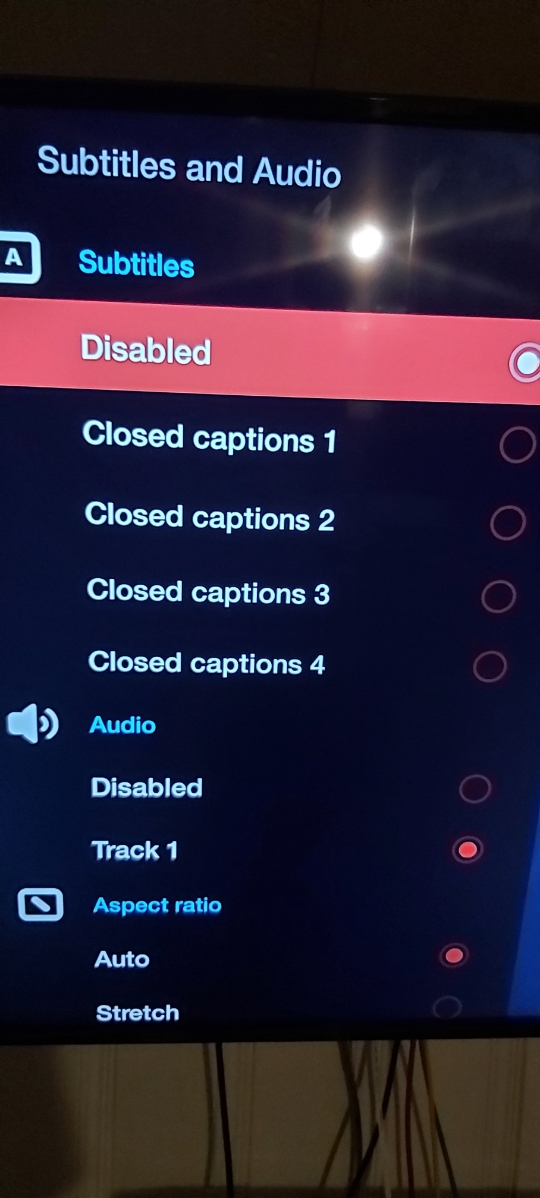
    That menu has nothing to do with captions To see captions hit green button while in live tv
  21. nbs. replied to chan's topic in XRS4900
    that pic has nothing to do with media player you need to be on default player for captions to work
  22. The 4900 currently has buzz 5 The 4500 will get buzz 5 but no eta yet Both have good quality pic Slighter faster on the 4900 but if you are not into recording the xrs 4500 is a good choice
  23. nbs. replied to PPett's topic in XR4000 / XRS4000
    I'd like to confirm that you are leaving box on when you record and also not changing channel
  24. nbs. replied to PPett's topic in XR4000 / XRS4000
    No one asked you to wait They were talking about another issue
  25. nbs. replied to chan's topic in XRS4900
    Go to menu ,configuration settings, media player to change player You need a mouse to work netflix Buzz dies not have a license for Netflix

Account

Navigation

Search

Search

Configure browser push notifications

Chrome (Android)
  1. Tap the lock icon next to the address bar.
  2. Tap Permissions → Notifications.
  3. Adjust your preference.
Chrome (Desktop)
  1. Click the padlock icon in the address bar.
  2. Select Site settings.
  3. Find Notifications and adjust your preference.