gig63
Members
-
Joined
-
Last visited
Everything posted by gig63
-
A Friend had the same thing we turned off CEC all good
-
I believe all remotes will work with all box's
-
That is not a Buzz problem that is your VPN problem turn it off and and download your apps or change location closer to you
-
Thats pretty low already and it will never reach zero
-
How long should this update take XRS4900 took about 30 seconds seems short for amount of things listed Thank you all for your time
-
Set it up just like you added TV. receiver, Xbox what ever else
-
Okay so I got it all out of him he had see the programs on the box and thought it would be easier to watch on the buzz box. I asked him what he watched the programs before and he said his new tv, I then told him buzz is really made for other than those programs and he will probably get better picture and sound out of the tv app, it should be the real app. So all fixed Tank you every one for your time
-
That's alright I appreciate all the help When he gets home and gets off his ass see what happens Thank you everyone for your time
-
I downloaded to mine and it opens but i don't have a Disney account so have to wait for the buddy to get home, he cant remember his login info.
-
It doesn't give that option it gives you update with google play store or aptoide nothing else Thank you for your time
-
Buddy phoned me saying he cant log into Disney + so i tried on my X5 and it comes up to update, so i tried with with google play store would not update, then i tried aptoide tv and wouldn't update either. I then downloaded the app from aptoide tv and when i click on it it comes up invalid user session, and Disney + as far as i get I have all the latest updates tried resetting internet and everything Thank you everyone for your time
-
The fastest changes i get is using TS, which is close will leave for now may want to try real time streaming come football time
-
Time to update first a little info: I have a X5 running provider on xc api, the box plugged into my Marantz SR5003 witch is plugged into my Samsung old plasma tv no cec turned on. I still have all the changes the same as when i posted last but one. I had to switch from Primary player to backup because my sound was out of wack with the video witch i have always had to use with any of the buzz box's, and now that i am on backup I have slow channel changes again. Just a heads up Thank you everyone for your time
-
Okay so with the changes that you suggested dishuser I took and reset my internet and cleared cashe, closed background apps and restarted, everything back to normal Thank you so much for your time
-
Okay maybe I'll put it back to auto see what happens Thanks
-
I made those changes and put it back to TS seams faster see what happens Thank you so much for your time
-
It is grabbing epg from xml would that make difference in channel change speed Thank you for your time
-
With the new update have had slow channel changing, I've done all the normal things cache, background apps, reboot, unplug internet, nothing has changed. I did find in live tv menu/settings/configuration go all the way to the bottom to stream format, it was on automatic after the update so i put it back to TS where it was before no difference update made no difference, I put it back to auto now Everything is set to the way it was before update Thank you for your time everyone
-
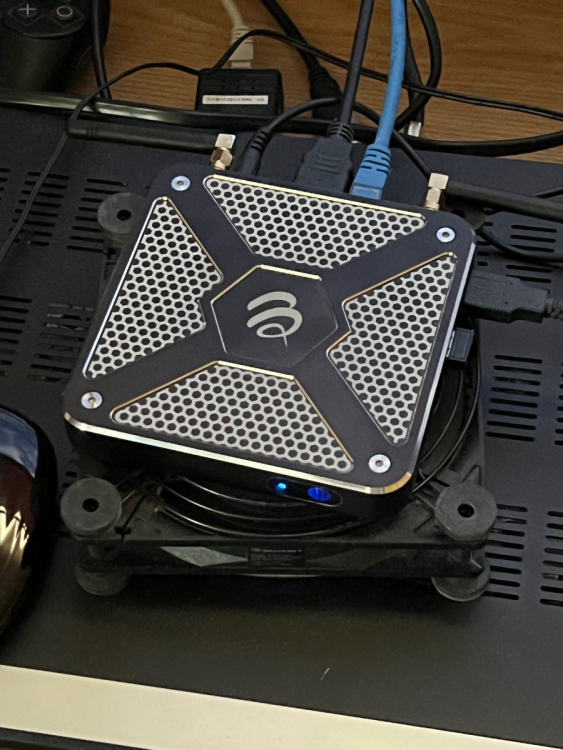
I have fans on all mine just on low stays cool
-
Thank you to everyone behind the scenes good work Have a great day everyone
-
I had the same problem, everytime i turned the box on I would have to repair the remote How to fix: Turn wifi on then repair
-
All of the buzz remotes work for that box check here buzztvglobal
-
It's working fine I seen the update and seemed strange not to be able to update Thank you
-
I am trying to update android system WebView all i get is can't install android system WebView Thank you so much for your time
-
Well that would totally S__k to have a nice remote like this and no back lite Was the whole reason i got the buddy to buy the the new classic was the BT 250