Woody
Members
-
Joined
-
Last visited
Everything posted by Woody
-
Noticed that p6 is not sending hd video only getting sd. I factory reset and still not putting out hd. Thought it was my tv settings so i plugged in my 4900 and tv automatically went hdr10.. running current firmware on p6. I also went in and chamged the hd setting from auto to hd .
-
Have not had to do one yet. Love this box its awesome.
-
Unplug box. Insert tooth pick in hole plug box in hold tooth pick in til boot menu pops up
-
Oh well it is what it is. Lol. Still loving my p6 tho
-
I have 4900 that works fine.. as u have to go to internnal storage menu to clear cache so sounds like it us android 13 issue not a big deal as u can clear cache by going into either the app menu or internal storage menu. Just wanted to bring it to tge buzz teams attention
-
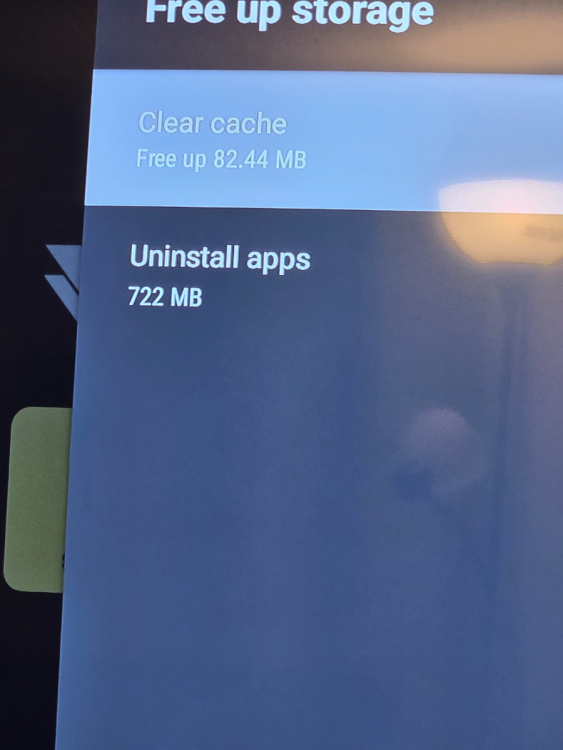
When u go to use this option to clear cache it does nothing
-
Yes it works that way and by going into internal storage. Im just saying if u go to the free up storage menu and try to clear cache that way it does not work
-
The clear cache button in the free up stoage menu does not work. I can clear cache by going into imternal storage menu and clearing cache that way but under the free up storage menu it does nothing
-
Already done that.. powercycled everything.. its the app im watching same srrver on my 4900 buzz 5 with no issues
-
Defineatly need the buffer time oncreased not sure what it is set at now.. but i m gerting freezing and stuttering on buzz 6.. i swtiched to my 4900 with buzz 5 and dont have any stuttering or lag...
-
Go to settings off the main menu the to add accounts.
-
Holy crap it defineatly is a beast
-
I ve got mac server and it happens prettty much all the time on all channels.it only occurs on live tv channels vod has no issue
-
Ive had that issue myself.. no problem with stream just keep getting that message. Its vety annoying lol
-
As far as i know.. that is a great big no
-
Go to setting then to buzz tv utilities make sure light bar is on. If it is off light on top will not stay on
-
I also have a 4900 on same provider thats wifi and i dont have the buffering issues that p6 is having.. and the buffer time on the 4900 is 10 sec
-
And yes power cycled router and modem
-
Wired and power cycle it every time i go to watch tv
-
Is there anyway to increase buffer timexon buzz 6 app. Seem to get channel stream error and lagging occasionally. Am on current 1.0.96 version. And my net speed is 1 gig diwnload
-
Srry got ahead of myself did not see that part of the info.
-
What about p6 running 938
-
-
no u can only do by number by name or postion that they are in cant rearrange or move them to ifferent positions like u can in buzz tv 5
-
Group channel numbering and ability to arrang channels how we want in favorites .. theme as well