Nelutz
Beta Group
-
Joined
-
Last visited
Everything posted by Nelutz
-
Ok I msg @allaboutbuzz with my mac to get those updates 🙂
-
I will , I will try tomorrow again 🙂 or I will msg @allaboutbuzz with my mac
-
I just got my 4900 ,I did the update but the IPTV version is still at 5.0.766 ,when I updated said that will go to 5.0.777??
-
Is there any news on to get bumped to android 11(it could easily work with android 11)? Or no updates anymore.
-
Just got one today from the buzztv site ,the refinished one(looks like new), I have to try it , since I have the 4500 😁, to bad is based on the android 9 but still is a good box ,I might get U5 too 😁.
-
Ive tried with both ,but seams like it doesn't want to come back from sleep mode ,it comes back but only if I do that within maybe 20-30min after that doesn't want to come back.
-
Hi guys ,I downloaded the other day the buzztv beta system update 2.220914 ,FW version V20220919 , and the IPTV version 5.0.779 and I saw that the box doesn't come back from the stand by mode, I have to unplug it from the wall to get the box back to life 😐 is there any official update coming for the xrs4500?,I'm still testing it since I got this beta few days a go but this is the most annoying bug that I see for now.
-
I'm using Tivimate at this time with my buzztv and no issues so far , actually I prefer tivimate because it has the option to see all the servers that you have on one list no need to disconnect and connect to other server ( all the servers are staying connected on one list), Maybe you have other apps that they conflict with tivimate, or depends where you download it from ,try to update it in Google play, i bought mine and I updated in Google play.
-
Ask the seller of that service to change you to User name and password, and you can put that on any box that accepts xtream codes., including Buzztv boxes😁
-
I had this from the moment they released the beta ,and still have it on some servers,with the primary player and most with secondary player, waiting on a new update.
-
I did a reset of both of my xrs4500 ,and still I can't get the secondary player to work on that specific server and some channels from other servers, well I gave up😕,I will leave it like that work only with main player.
-
Uif you did the update ,than probably you using the secondary player from the previous set-up, main player is better option now 😕
-
Ok I will do that today is not like I have something to do ,with this snow storm😁
-
No is not like that I have doubt in what you saying,but is weird because I have two xrs and both have the same problems and I do all the steps to make it work but it doesn't maybe I do something wrong or I miss something 😕, plus now if I stay in a channel that it shows me stream not available for 5-10 sec the app restarts and push me to the home screen 😕
-
Hmm ,maybe I have two xrs4500 that are broken?because it can be a problem with one but both are not working with that server , tomorrow I will try it on another xrs4500 to see if is true ,I will provide you with another log in that server and I want if possible to you to take a shot video an show me that is working on yours?
-
Yes is working with the default player😕 , weird because before this new buzztv 5 ,with the 4 I never had any issues with any server on the secondary player 😕
-
Yes I did that ,still the same problem on both xrs4500😕 ,is working on other servers but on that server is like I have to use the primary server to see the picture.
-
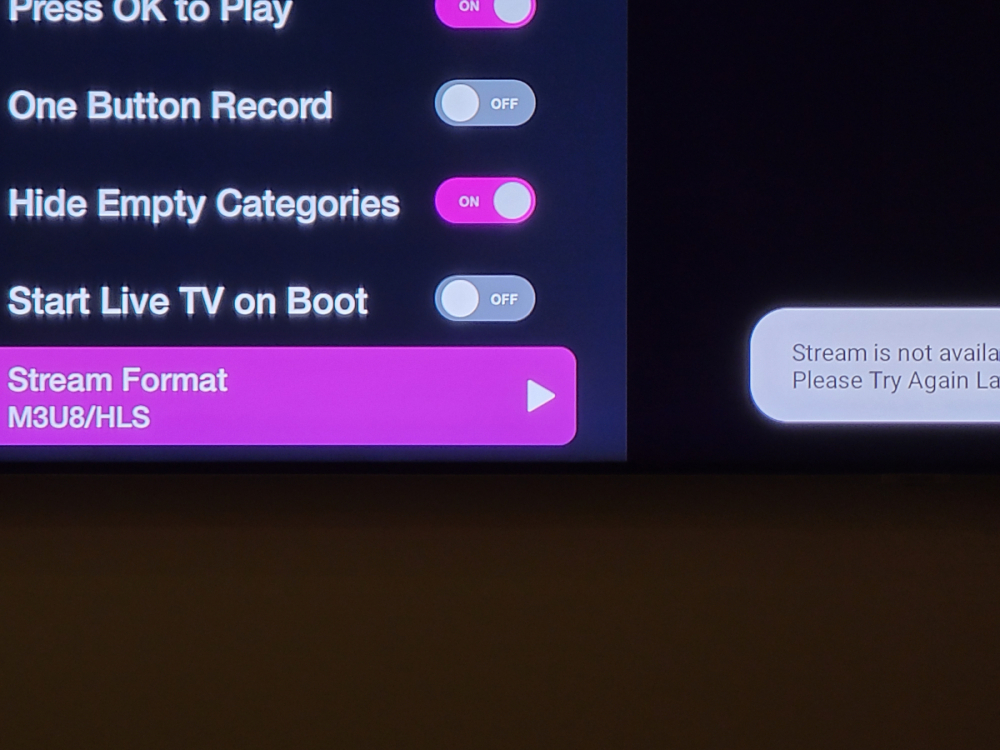
Yes I did a reset , ofcorse with out back up, and after 30min I put back all my apps and servers, but the problem with that specific server that doesn't work with secondary player is still there ,I don't know how is working with you because like I said I have two xrs4500 and both not working with secondary player on that server I've change it the stream to HLS still the same problem 😕"stream not available"
-
Wow ,so something is wrong with my 4500
-
Yeah is doing the same to me and I was waiting for 3 hours than I give up, btw I have a lot of restarts on the buzztv app when it shows me stream not available than the app restarts😕
-
Doesn't want to take it 😕 gives me error
-
😕 Anyway ,it might be the device maybe I have to do a reset ,but is such a husle to type back all the servers 😕
-
I don't think is from the server, is from the app because last update o could rearrange the favorite channels by the way I add them to the list ,I'm talking inside the app not the home screen,now it shows me only by name or by number ,if I choose the third option to show me favorites like the way I add them still shows me by name ,I've tried to restart the app the box etc.
-
Another issue I found and I hope is not only me ,I can't organize the favorite anymore 😕
-
Unfortunately for the server I have is not working, is working for the other servers I have but this server is giving me the "stream is not available" well I think for this server I have to leave with that😕