

jeepersmr
Members
-
Joined
-
Last visited
-
Im having the same issue with my XR4500 with the apps icons not being able to save after moving them on the home screen. using modern
-
im sorry...they do move, they just wont save. once i open any other screen then back to the home screen, their back to their original positions...i am using buzztv modern.
-
im running buzztv 5 on a buzzstick and when i move the apps on the bottom row of icons on the home screen to the positions i want them in, they wont save. is there anyway to turn those apps off from showing up at all down there?
-
this link doesnt seem to be working. is a hardware reset a Hard reset or a factory reset. your youtube channel has both videos
-
How or what is a pin reset?
-
after updating to Buzztv 5 on both my vidsticks the error pops up "BUZZTV KEEPS STOPPING" and it keeps on recycling this error between the buzztv 5 logo and the main screen. cant get to any of the setting. I can only power off and on with the remote and it keeps recycling the error.
-
When i go to check for the new update to buzz5 it says there are none. then i type 2015 and this is what i get server id for vidstick v2 is server id for vidstick is
-
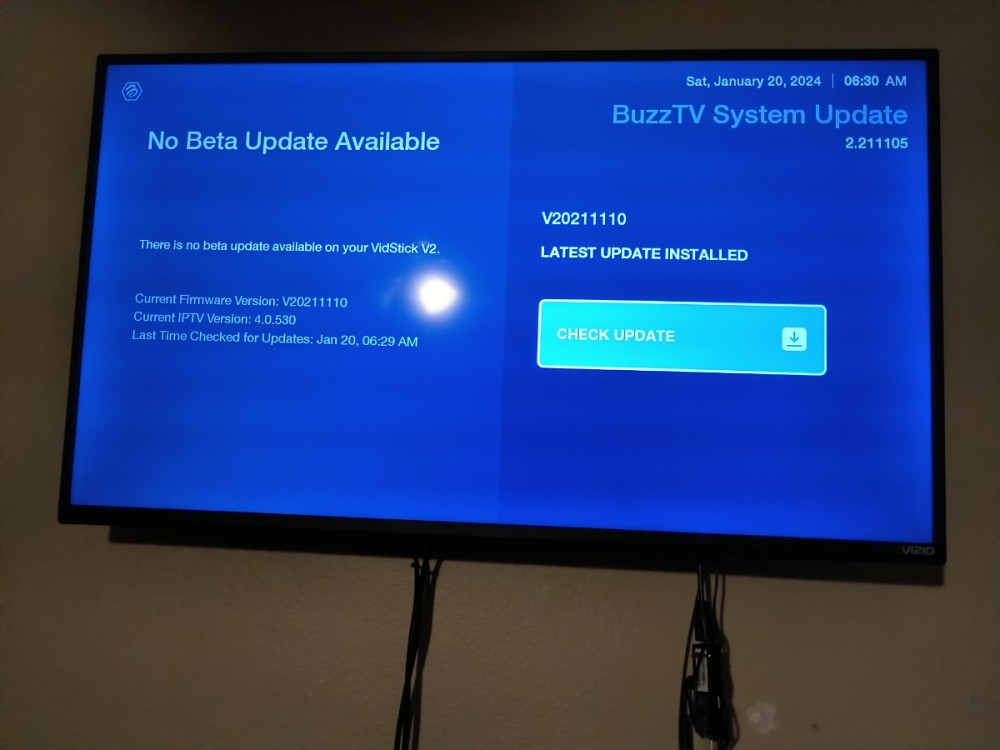
i ran the update and there was none available typed in the 2015 on the remote and it saying "No Beta Update available" It didnt give any instructions.
-
Firmware ver. V20211110 Current IPTV Ver 4.0.530 Buzztv system update 2.211105 I dont see a "software version" or can you direct me where to find it
-
How long should it take to bacup the XR 4500. I had to finally cut the power to it after 30 min. Rebooted and looked at the backup file which is 1.9gb. does this sound correct Also what all backsup?
-
I had to do a reset of my st-4000 vidstick and its asking to pair and it will not pair n using the OK and vol down buttons. the screen says SEARCHING...and never pairs. the LED is flashing red and the IR is connected. just wont pair. is there any way around this bluetooth pairing?
-
it is random when it does pop up but most of the time its when right after ive rebooted the ST4000, i will need to monitor it little more closely to see which software im have running when this happens.
-
Anyone else having this issue with the vidstick ST4000. After the last update, the navigation bar will randomly pop up and will not go away. the only way to make it go away is to reboot . The navigation bar setting is set to OFF
-
My router is currently in "router mode" is this where I turn it to "AP mode"?
-
not sure...you tell me
