

Leaderboard
-
allaboutbuzz
Moderators33Points1,696Posts -
Emporium
Members29Points2,291Posts -
dishuser
Members15Points4,638Posts -
nbs.
Members11Points3,652Posts




Popular Content
Showing content with the highest reputation since 10/01/2026 in all areas
-
NEW UPDATE V973 Oct 15th, 2026 Changes: - Live TV Bug Fixes - PVR Bug Fixes - Server Bug Fixes - VOD Bug Fixes Sent to all Android 9, 11 and 13 Boxes running Buzz 5 Please leave feedback below Thanks6 points
-
5 pointsJust wanted to update this post, I received the new Classic AI and using the backup from my Classic it transferred all my settings and favourites to the new box.5 points
-
Schedule recordings from the mobile app on the box at home. Remote control app as well to control the box. We're looking into watching recordings outside the home as well.5 points
-
4 points
-
Buzz Linux OS Update Official Update Version: 20261026152019 October 26th, 2026 YOU CANNOT REVERT BACK TO OLD VERSION AFTER TAKING UPDATE. Changes: - Fix/Optimize WiFi driver - Fix VPN support - Stability fixes - Improve media playback - Improve OTA stabillity - Update BuzzTV to v1.0.381 - Fixed boxes stuck on older app updates. YOU CANNOT REVERT BACK TO PREVIOUS VERSION ONCE INSTALLED. UPDATE WILL APPEAR 1 HOUR AFTER BOOTING THE BOX OR AFTER 2 HOURS IF BOX IS LEFT ON* **FIRMWARE UPDATES ARE SEPARATE FROM APP UPDATES** **BOX WILL REBOOT TO FINISH INSTALLATION**4 points
-
BuzzTV Mobile App Update Version 1.0.19 Release Notes: We are excited to roll out the latest update for the BuzzTV Mobile App! You can now cast to your TV and keep watching in Picture-in-Picture on both Android and iOS. Live TV navigation and the EPG are also improved, along with a number of fixes for a smoother experience. 🆕 New Features Added New Feature: Casting: You can now send VOD and TV Series content from your phone to your TV with Chromecast. Live TV casting works on HLS streams. Many servers only allow one connection at a time, so playback on your phone pauses while you’re casting, and an on-screen message shows that casting is active. Added New Feature: Picture-in-Picture (PiP): Keep watching in a small floating window when you go to your phone’s home screen or open another app. Works on both Android and iOS. ✨ Improvements Added Channel Navigation Arrows: The arrows for moving between channels in Live TV are back. Improved Full-Screen Button in the Channel List: The full-screen button in the channel list is now easier to tap. Updated Android App Icon: The app icon on Android now displays correctly. 🛠️ Bug Fixes Fixed Live TV Channel Info After Switching: The full-screen Live TV player now updates the channel title and logo when you switch channels. Fixed Live TV Screen Layout: The Live TV screen layout now looks the way it was designed. Fixed Missing EPG in Channel List: Program guide info shows in the channel list again. Fixed Full-Screen EPG Button: The full-screen EPG button works again. Fixed Live TV Navigation Reset: Live TV now keeps your place when you move around the app, instead of resetting. Fixed Missing TV Episodes on MAC Servers: TV Series episodes from MAC Portal servers now show up correctly. Fixed TV Series Back Navigation: You can now go back to the previous screen after opening a TV Series. Fixed Search Result Playback: Content you open from search results now plays correctly. Please Leave Feedback Below Apps can be found on the App Stores Apple: https://apps.apple.com/us/app/buzztv-mobile/id6756312224 Android: https://play.google.com/store/apps/details?id=com.buzztv.iptv.mobile4 points
-
Update was fixed and sent on V21 for Android today Was a build error on our part4 points
-
Turning off real time streaming and tunneled playback solved it for me. Thanx everybody.4 points
-
BuzzTV 6 IPTV App UpdateVersion 381 UpdateNow Available for the L1 YOU CANNOT REVERT BACK TO OLD VERSION AFTER TAKING UPDATE. Changelog:We are excited to roll out the latest update for the BuzzTV 6 IPTV App on the L1! This is one of our biggest releases yet. It brings Downloads for movies and series, your choice of where movie and show info comes from, new theme colours and a faster EPG, plus a long list of recording, playback and stability fixes. 🆕 New Features & UI EnhancementsDownloads & Storageeasier to find. Content & PersonalizationAdded New Feature: VOD Info Source: A new setting in Configuration lets you choose where movie and TV series info comes from: Server Only, TMDB First, or Server First. Added Metadata Images in List View: List View now shows background artwork for movies and shows. Redesigned VOD & Series Info Screen: The info screen has a cleaner layout, and the info pop-up text in List View is larger and easier to read. Added 5 New Theme Colours: The theme selection menu has five new colours, each with a colour chip so you can see it before you pick it. Guide, KeyboardAdded Auto-Scrolling Titles in the Grid EPG: Long program titles now scroll automatically, so you can read the full name. Improved Keyboard Support: Keyboard text is easier to read, holding OK now switches to the alternate letters right away, and the Universal Search keyboard layout has been cleaned up. Faster EPG Loading: The EPG no longer asks the server again for guide data it already has. Recordings & PlaybackAdded Seeking on Catch Up: Catch Up now has full remote control. Press up from the info bar for the time bar, use left and right to seek, and press OK to play or 🛠️ Bug Fixes & Performance ImprovementsEPG & GuideFixed XML EPG Not Loading: XML EPG sources load correctly again. Fixed Guide Button in the EPG Grid: Pressing Guide again with the grid open no longer locks the box. Fixed Category Navigation: You can press the right arrow on a highlighted category in Grid view to open it again. Servers, Backups & MetadataFixed Restoring from Backup: Restoring servers from a backup no longer fails when there are movies in shared categories. Fixed Locked Servers, Expired Server Downloads & Episode Info: Fixed editing locked servers and downloading from expired servers. Episode info no longer disappears either. Stability & UIFixed Crash on Long Episode Lists: The app no longer crashes when you scroll through a long list of episodes. Fixed List View & Navigation: The colour buttons and hold-OK work again in List View, and VOD rows now return you to the exact title you left off on. Fixed Theme Colours: Button and icon colours now display correctly in the B&W and Scorched Magenta themes. Fixed Radio History: Clearing your Radio history no longer clears your Live TV history. Fixed Minor UI Issues: Fixed the Loading flash in the channel list, the grey box in Multi-Screen, the wrong button being selected in the recording popup, and QR code issues.Added New Feature: Downloads for Movies & Series: You can now download movies and TV series episodes to watch later. There is a new Downloads section in the main side menu and a Download button on the VOD and Series details page, and for series a popup lets you pick which episodes to download. Downloads are also available from List View, and you will get a notification when a download finishes or fails. Improved Downloads Storage Location: The download storage setting has moved out of the PVR settings menu and into App Settings in the Configuration menu, where it is Please Leave Feedback Below **Pop Up for Update will Appear or you can Check App Updates Manually. **App Updates are separated now from Firmware Updates. **App will Restart to Home Screen to complete Installation ** App will automatically install after 2 hours of no user input.3 points
-
3 points
-
3 points
-
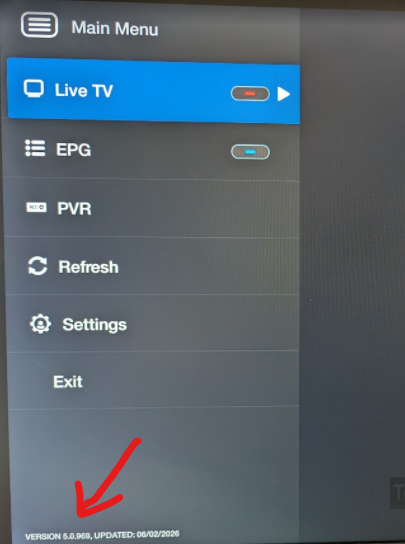
I followed your instructions and found that I do have the same 5.0.969 version. I then navigated to the backup options and can now see the 2 options you mentioned. It is great indeed that the backup file can be restored on newer devices. Thank you kindly for taking the time to provide a complete and helpful response that quickly helped find what I was looking for.3 points
-
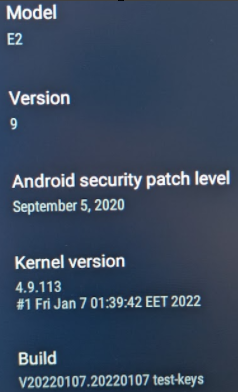
That is the kernel, I wanted the buzztv version. That is where the functionality is. My kernel is a little older than yours. And no, there is nothing newer as far as I know. And really no point, if it ain't broken, don't fix it 🙂 But BuzzTV I am running 5.0.969 (which is pretty recent - from earlier this summer). If you do not see that, hit "Settings" in the menu and then you should have option for "Check for Updates" so it can get latest version of the app. If you have recent enough version of BuzzTV 5, From that menu (which you can get to by hitting the menu button while in LiveTV), you can go to Settings->configuration and if you scroll down a bit, the first item under "App Settings" is "Backup&Restore". And that is where you can do the backup I am mentioning. And the nice thing about this version is that the file it generates can be used to restore on pretty much any BuzzTV device going forward, so you can easily setup a new device if you ever upgrade and not need to redo all your favorites.
 3 points
 -
3 points
-
that's why I've always said fresh batteries not new batteries3 points
-
Just working my way around the new Classic AI, and I've found a couple of things; Under Utilities, Power Options, Power On Action it's stays on default regardless of the setting selected. Power Off works fine. Under Utilities, Remote Control, pointer speed changes won't save the setting I select, always reverts back to zero.2 points
-
2 pointsYou can try few suggestions. Reboot your box, Reseat hdmi cable on both ends, try a different hdmi port or tv, replace hdmi cable if possible, and worst case try a factory reset but make sure you backup your servers and other settings if possible and see if this helps. Reset do it on your own risk. :)2 points
-
2 pointsHave you tried changing the HDMI cable ? Depending on the resolution/bitrate of the videos, the cable may be borderline. A Good quality HDMI cable is important on higher bitrates.2 points
-
2 pointsThis topic can be closed He never let me have a look at it to try ttoubleshot at my end....was supose to drop it off and then....told me his wife decided to send it back 🙄.....thanks guys for tryin to help me.2 points
-
2 pointsCheck the remote carefully and make sure it is snapped closed properly. Wife drops my older BT200 often and when it doesn't seem to register, it is always because the case has slightly split open (barely visible). Quick squeeze/snap back together and works fine again. And I would stick with an original remote (like Ryu mentioned above). Otherwise you will have "fun" trying to map the buttons (colored buttons, menu, info, last channel, etc..). Not worth the hassle.2 points
-
2 pointsBuy from here any original remote control. BuzzTV DirectRemotesBuzzTV Powered by Android™. The Custom BuzzTV 5 App Will Transform The Way You Way You Watch Television. Experience Fast Steaming, Ultra 4K HD Picture Quality & Live Streams All Around The Globe. Get2 points
-
2 pointsNo information on guide is almost always server side issue Loading is usually box related2 points
-
2 pointsCould also be the EPG server is down. I know of at least one service who's EPG has been down for the last 2 days.2 points
-
2 points
-
2 points
-
Huh ? Don't know how you came up with that assumption. I'm in Canada also, and have no issues with it, works fine on at least 3 different services, with and without VPN enabled. Some ISP in Canada now block many streams from a few different IPTV services, some ISP are worse than others. VPN is often a requirement lately with some services&ISP in Canada, especially during prime time evenings.2 points
-
2 points
-
That is pretty tell tell sign that your internet provider is blocking during prime time. Typically just before puck drop (7 or 8 pm), many channels go dark. And then once games are over (around 10 to 11pm) everything is fine again. If this persists, you will have to get yourself a VPN service to bypass any blocks. Please keep in mind that this is the last mention of this topic, since we do NOT provide support for IPTV services or 3rd party apps here (there are other forums for that). Issue is NOT the buzz box. What he meant, was to go into Menu when you are in LiveTV and scroll down to the Refresh option. Forces a reload of the playlist/channels and all their links.2 points
-
2 pointsForum upgrade: please read before signing in We’ve upgraded BuzzTV Help to the latest version of our forum software. You’ll notice a fresh look and some new features. One important change: you now sign in with your email address, not your display name. Your display name hasn’t changed and still appears on your posts as before. Only the login is different. Can’t get in? Use the “Forgot password” link on the sign-in page and enter your email address. If you no longer have access to the email on your account, contact us and we’ll help you update it. A few older features, like status updates, are no longer available. If something looks broken or missing, let us know in this thread. Thanks for being part of the community!2 points
-
2 pointsI forgot it was changed before it woulldn't list buzztv 5 backups but now it does2 points
-
2 pointsWell, On the L1, when BuzTV 6 (lite) V1.0.105 was released back in February (at least on the L1) the release notes stated: I have not tested it on the classic AI, but if I get a sec, I can try it later tonight after I get home.2 points
-
Great Dudette. No chance. You must have misunderstood, because there is NO buzz box that came WITHOUT a version of BuzzTV already preinstalled and functional. I got all 3 of my X5 boxes (X5 128AI, X5 64XC, and X5 SS) before they were released to general public and all 3 had BuzzTV preinstalled and fully functional. So there is NO way yours came without it.2 points
-
2 pointsThis thread HAS zero to do with any storage or recordings. When it is mentioned to remove some categories, it is that some services/panels allow resellers to customize the categories that are available to users accounts. So instead of having 100 categories, where you don't ever watch 60 of them (international, specialty, etc..), then why not remove them and therefore you box does not see them or need to sort or index them. This can help speed up some devices. Not all services offer this amount of granularity, but some do. I have one service where I can literally select nearly every single category and enable or disable it at the server panel level. I even have one user who asked to enable only 1 category (50 some channels) on his account. So instead of getting over 13000 channels, he only sees just over 50, so loading up or refreshing channel list is super fast.2 points
-
2 points
-
2 pointsHe did say he tried with BOSE headphones also and got same result. I tried 2 different BOSE headphones and had no issues. I'm assuming however that he has at least unplugged the power waited a few seconds and then re-plugged it to power cycle it. Using the remote to power it off is obviously not the same (especially if device is configured to suspend instead of shutdown)..2 points
-
1 point
-
1 pointMight be unlucky (it can happen). If he has another USB-C power supply (most do, since most phones today use USB-C), he can try to swap power supply/USB-C cable. If TV has an option for CEC, maybe try turning it off.1 point
-
1 pointExactly what you told him, try another HDMI. Try another HDMI port maybe. And if he has another TV, maybe try another TV (or computer monitor can work if it has HDMI input). When you say "blinking" on the box, are you talking about the Video output, or the LEDs on the box are blinking ?1 point
-
1 point
-
Have you uninstalled the app and tried to reinstall? Also android or apple?1 point
-
I put it on my iPad works really well Thank you1 point
-
1 point
-
1 point
-
1 pointreboot your box? tried on over 20 servers here and no issues with any of them.1 point
-
1 point
-
1 point
-
No issues here. Both of the 2 main services, I have, still work perfectly fine. Have you tried turning on a VPN ? Many ISP are blocking certain CDN networks used by IPTV services. And lately they seem to start around the time that local hockey games or other sporting events are starting to air. If you don't have any paid VPN service, you can always download and install Proton VPN. And you can create a free account, which works relatively well.1 point
-
1 point
-
You did misunderstand Buzz 5 has always been functional Where the misunderstanding might have come from is there was talk of buzz 6 becoming available after it was released but buzz 5 has always worked1 point
-
1 pointMy 10gb box was filled 9.5 gb and did same thing got rid of kids stuff and made big dif.. id like to delete more but cant fig it out1 point





