.png.70d549fedb1d83b5b1ad3c7a01d9c888.png)
PapaS
Members
-
Joined
Everything posted by PapaS
-
Remember the motto "If it doesn't work right, SHUT UP!"🤣
-
Thanks
-
Never got it and that's probably my fault too🤣
-
I thought had to download files to a USB drive to do it. I don't own a computer and if I did I still don't know how to use one. I'm older don't have any friends that have one to use so I'm stuck.
-
Yeah it's my choice that I can't afford a computer. Shame on me 🤣
-
I didn't plan on having to drill holes and install 50ft of ethernet cable either and I didn't plan on being stuck on original firmware either 😅 oh well.
-
I had this issue too, I never found a fix. Now I'm using ethernet because it happened steady and didn't have wifi issues on any other devices. Stays connected hardwired.
-
Thanks
-
I'm still waiting for my sd card to be sent to me. I was told last week by @allaboutbuzzbut maybe forgot?
-
@dikuser I don't know 😕 why you're bringing up my sister Karen. She has nothing to do with buzz. Grow up, shut up and keep things on topic instead of insulting people (my sister). If you have nothing intelligent to say and you don't, than just zip it. You are single handedly wrecking this forum.
-
Thanks
-
Thanks @nbs.Do you have there email address. They contacted me earlier requesting receipt of purchase but I can't seem to leave a screenshot but I could forward it to them from my email.
-
Thanks again @Emporium.Happy to know
-
Thanks @Emporiumfor that info. Unfortunately that 0624 is my current firmware and don't have a computer I'm wondering if I don't update, will my box become toast eventually for not updating?
-
Is there a way to get this update if you don't have a computer?
-
@JLHthat could depend on so many factors on how you've got your sound system configured. But like @allaboutbuzzsaid if the audio pass through is "on" on the x5 and it's not working it could be a setting in your tv or receiver most likely. 🤔
-
My x5 is processing all Dolby formats properly.
-
-
-
See this is the thing, the box for you is all about the iptv app which is cool but for me it's a high quality streaming device. Different strokes for different folks thats all. Appreciate your point of view. I also didn't make the buzz tv 5 app not accessible, one button press on the remote and I'm in. Thanks again for your response 👍 🙂
-
-
@emporium I guess people have different ideas about streaming and the devices that they like to use. Just because somebody uses or doesn't use certain features on any given device doesn't mean it is no good. Believe me in no way am I trying to take anything away from the x5, I'm actually bragging about it's versatility and ability to customize. I've tried alot of devices and the x5 is far superior to anything I've tried. The specs are outstanding, lightening fast speeds, with or without iptv I still think this box is the best streaming device I've used and worth every penny 😀
-
I've been using it for a couple of months and it's working flawlessly.
-
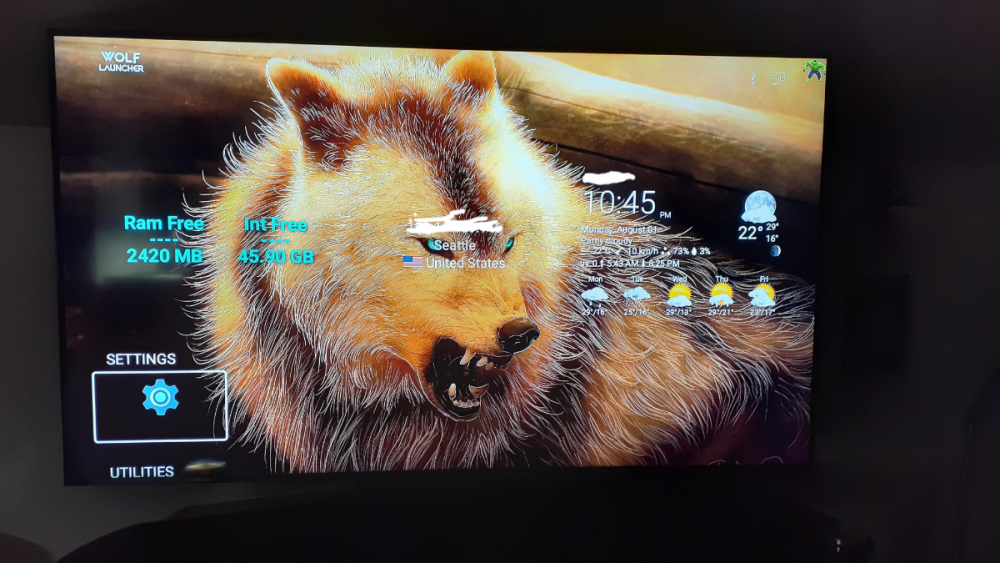
You can totally customize homescreen using a launcher manager and wolf launcher, with whatever widgets you want 😉
-
https://stbtalk.com/index.php?/topic/3138-x5-constantly-cycles-thru-boot/&do=findComment&comment=13488
.thumb.png.0a667c4ea02c8a36adda3a7ccdeb7a1e.png)