

Maxdout38
Members
-
Joined
-
Last visited
-
First of all, I am in the United States. I have tried the option above with a VPN & without a VPN. Thru the Google Play Store, this application in NOT available. See Picture #1: Picture #2: I can continue to scroll down but the application is simply not there.
-
nbs. I found the app. This is just a version of regular YouTube. This is NOT YouTube TV. YouTube TV is your live live like Hulu Live. I have it on my shield that runs Adroid 8.
-
Sorry I will search for smart YouTube TV.
-
It is not there
-
YouTube TV not YouTube. Please read all posts history.
-
Ok, I searched for Youtube TV. There are (2) options. Version 3.14.1 does not work. Will not open at all. Version 1.08.03 Does not work. Opens and give me the guide. However, when I click to watch live TV, I get playback errors. Version 6.17.505 is not available in aptiode. I went to Google Play and no Youtube app comes up when searching for Youtube TV. Thank you Maxdout38
-
Before I try this, are you using the beta firmware. I am not signed up for that version.
-
Yes no problem, would you be so kind to send the link for this version? I am having difficulty finding this one. Thanks for the help.
-
If you read my post, I indicated it doesn't come up as an application in Google Play.
-
There was no YouTube TV app pre-installed. Only YouTube. There also is no option in the Google play store.
-
I tried 2 different versions from Aptoide and one will not install. The other will let me in, but receiving a Playback error on all channels selected.
-
I cannot find a version of this app that works with the XRS4000. Anyone have one?
-
Part 2:
-
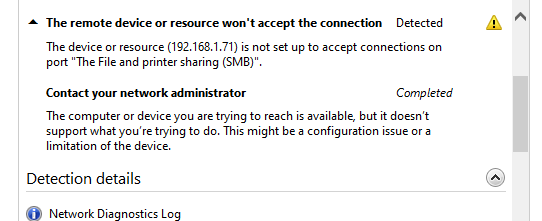
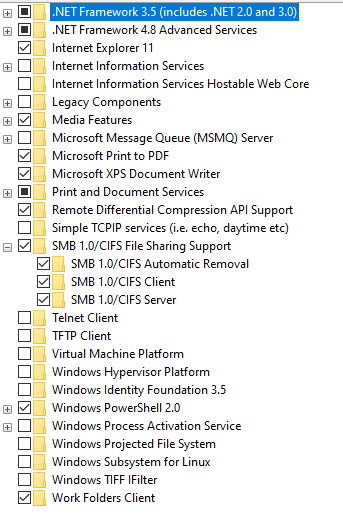
Hello All: My XRS4000 is not showing up in the file explorer to add to my home network. Yes, I have SMB enabled because I also have a Nvidia Shield as a device on my network already. The Buzz is hooked to a LAN and assigned to 192,168,1,_ _ (last characters left off intentional) I'd like to be able for it to be seem=n on the network. Plex cannot access from the network to Buzz. Any help would be appreciated. Thank you Maxdout38
-
Is this why I cannot get YouTube TV to work? I downloaded the apk and installed via USB. Also Poker Championship does not work either.