Skip to content
View in the app

A better way to browse. Learn more.

BuzzTV Help

A full-screen app on your home screen with push notifications, badges and more.

To install this app on iOS and iPadOS
  1. Tap the Share icon in Safari
  2. Scroll the menu and tap Add to Home Screen.
  3. Tap Add in the top-right corner.
To install this app on Android
  1. Tap the 3-dot menu (⋮) in the top-right corner of the browser.
  2. Tap Add to Home screen or Install app.
  3. Confirm by tapping Install.

Gene L

Members
  • Joined

  • Last visited

Everything posted by Gene L

  1. Gene L replied to Gene L's topic in XRS4900
    Yea ¯\_(ツ)_/¯
  2. Gene L posted a topic in XRS4900
    Jeez! That LED is so big and bright I can see it through my closed eyelids! Can it be turned off or dimmed? TIA!
  3. Gene L replied to Gene L's topic in XRS4900
    It's dead to me. Literally! 🙂
  4. Gene L replied to Gene L's topic in XRS4900
    YES! Thank you! Add - Back - Right worked perfectly! THANK YOU!
  5. Gene L replied to Gene L's topic in XRS4900
    Back button does nothing. I can go to All Apps and use Back button to come back. That's it. I tried every button and a keyboard/mousepad. Where is the Reset hole?
  6. Gene L replied to Gene L's topic in XRS4900
    At this point, I'm ready to hit a Reset button and start over, if I could find it....
  7. Gene L replied to Gene L's topic in XRS4900
    Yea, that's what I thought. Settings is on screen but I can't click or navigate to it.
  8. Gene L replied to Gene L's topic in XRS4900
    I've been trying. Settings is on screen but unreachable
  9. Gene L posted a topic in XRS4900
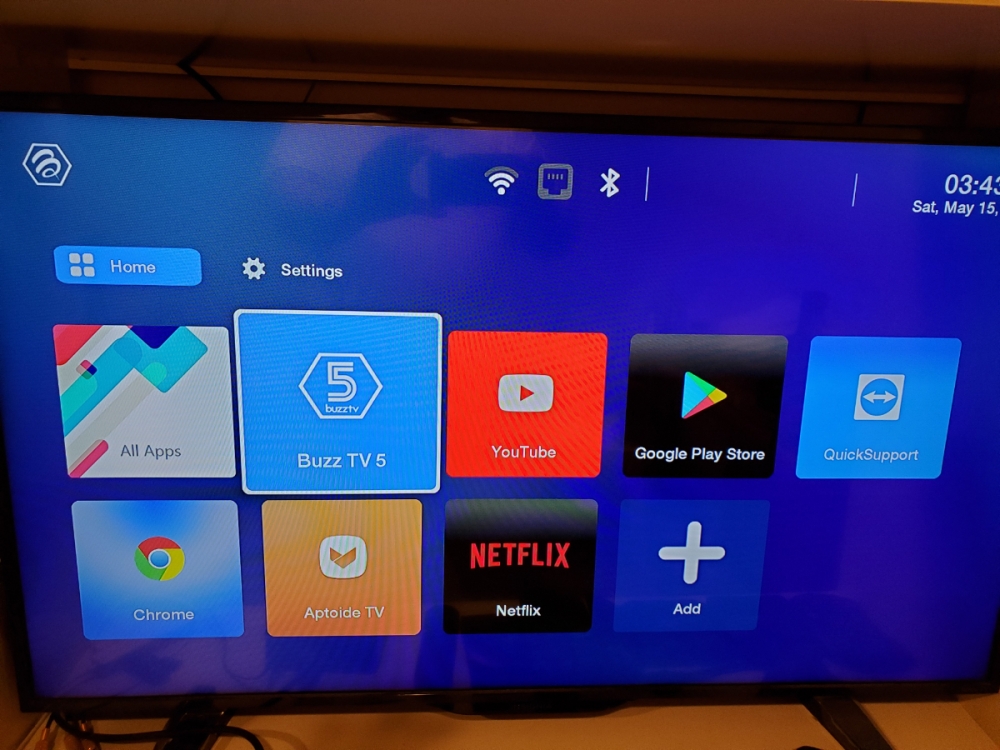
    I've set the box for a classic or #2 launcher and now I can't get to settings to set it back to Modern. This is too stupid to even have to ask... but all I have, other than the Apps, is Buzz TV 5 icon that takes me to the Server setup. How do I get to Buzz Utils? TIA!


Account

Navigation

Search

Search

Configure browser push notifications

Chrome (Android)
  1. Tap the lock icon next to the address bar.
  2. Tap Permissions → Notifications.
  3. Adjust your preference.
Chrome (Desktop)
  1. Click the padlock icon in the address bar.
  2. Select Site settings.
  3. Find Notifications and adjust your preference.