Philo
Members
-
Joined
-
Last visited
Everything posted by Philo
-
That email was from 'noreply@stbtalk. com I think I thanked everyone and if I didn't.....Thanks again everyone!
-
Posted in Lost Original Launcher Screen Thanks dishuser I don't get that screen when I try the modern setting. I tried all four and ran into all kinds of problems when I tried the Media... Go to this Post Posted in Lost Original Launcher Screen The 4500 Upgraded itself to BuzzTV 5 due to the reset. There are 4 launchers "skins" available, you can choose one of the 4. There is the modern... Go to this Post Did any of these replies answer your question? There may be more replies than those shown here. Help others by going to the topic and use the 'Mark as Solution’ button on the post with the best answer Stop receiving these reminder emails. — STB Talk
-
I got an email saying I should use the 'Mark as solution button' on the post with the best answer.....
-
A little off topic, but how do I find the 'Mark as Solution' Button?
-
I now have the black background and I think that's as good as its going to get. Thank to everyone for all your help!
-
I shall try that if I can figure out how. I have no media files on the box. I assume I should just get a black jpg and use that. Thanks again, dishuser!
-
Thanks for the replies, What was the launcher like before BuzzTV 5? I've tried all 4 in the latest update and none are the one I had before. Is ti possible to go back to the older version? It was black and white and very clean.
-
Thanks dishuser I don't get that screen when I try the modern setting. I tried all four and ran into all kinds of problems when I tried the Media ones.
-
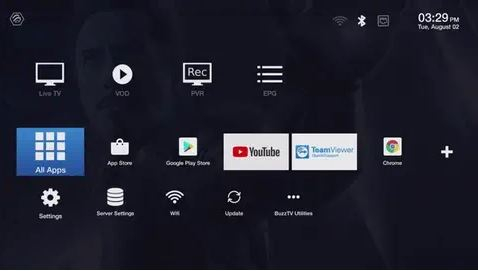
Newbie here. I had to do a hard reset on my XRS4500 and now I don't have that very functional launcher that came with the box originally. I tried the others in settings, but none are as clean as this one. There is probably something in settings, but I can't find if there is.