
Skip to content
View in the app

A better way to browse. Learn more.

BuzzTV Help

A full-screen app on your home screen with push notifications, badges and more.

To install this app on iOS and iPadOS
  1. Tap the Share icon in Safari
  2. Scroll the menu and tap Add to Home Screen.
  3. Tap Add in the top-right corner.
To install this app on Android
  1. Tap the 3-dot menu (⋮) in the top-right corner of the browser.
  2. Tap Add to Home screen or Install app.
  3. Confirm by tapping Install.

Biggy

Members
  • Joined

  • Last visited

Everything posted by Biggy

  1. The guy who posted here before us....
  2. This guy on top said he has the option on buzz4 and 5...
  3. I also don't have the fast epg option on my vidstick,I have the first vidstick that came out.....
  4. No I havnt will send..thanks
  5. same issue here on vidstick so frustrating.......
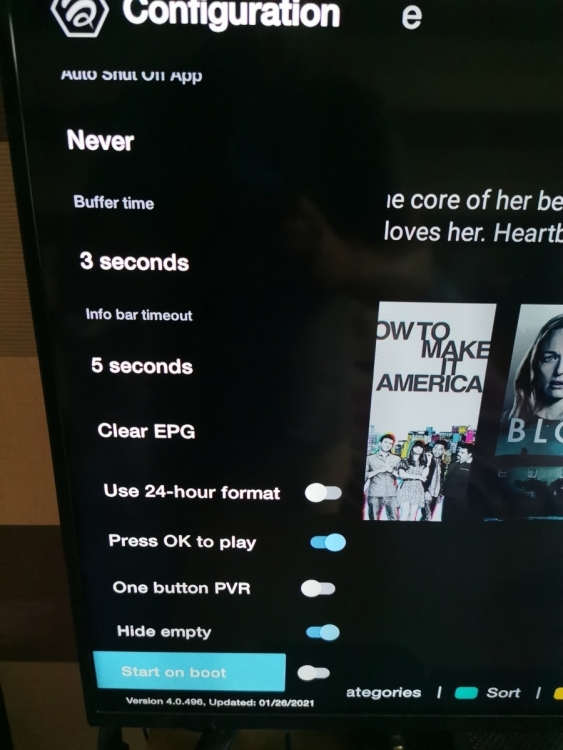
  6. On the buzztv app on the vidstick I have added a couple of playlists and the epg is behind or wrong have to adjust to correct it,it's not the playlist because on other apps the load fine..
Account

Navigation

Search

Search

Configure browser push notifications

Chrome (Android)
  1. Tap the lock icon next to the address bar.
  2. Tap Permissions → Notifications.
  3. Adjust your preference.
Chrome (Desktop)
  1. Click the padlock icon in the address bar.
  2. Select Site settings.
  3. Find Notifications and adjust your preference.